
HWP Viewer & Converter
Not claimedOpen Korean Hangul documents (.hwp and .hwpx) on iPhone, iPad and Mac — and turn paper…
By YEONWOO KIM · Productivity



About
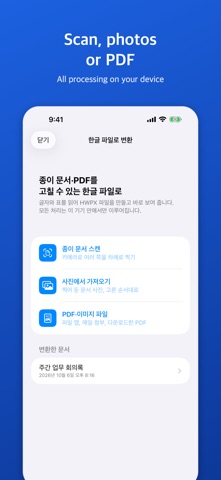
Open Korean Hangul documents (.hwp and .hwpx) on iPhone, iPad and Mac — and turn paper documents, photos and PDFs into Hangul files you can edit.
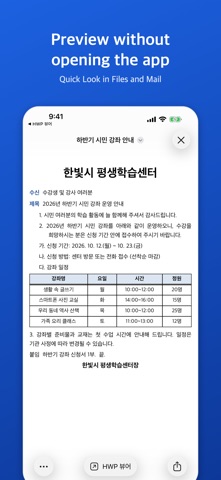
OPEN HANGUL FILES HWP and HWPX attachments are shown as laid out on the page: tables, pictures, text boxes, numbering and bullets, headers and footers, footnotes, page numbers, equations, shapes and charts. Distribution (read-only) documents from public institutions open too.
PAPER, PHOTOS AND PDFS TO HANGUL Tap "PDF·사진을 한글 파일로" on the first screen, scan a page or pick a photo or PDF: the app reads the text and tables, makes an HWPX file you can edit in Hangul, and shows it at once. Tables become real Hangul tables with merged cells and column widths; for PDFs that contain text, that text is used too for better accuracy. Files are saved in Files > HWP 뷰어 > 변환한 문서.
PREVIEW WITHOUT OPENING THE APP Tap an HWP file in the Files app and see it with Quick Look.
FIT TO SCREEN, FIND, PDF Reflow text to your screen, search inside documents, and save or share as PDF.
ON THE MAC TOO Buy once and use it on your Mac. Drop PDFs or photos onto the converter window, check the preview, and open the result in the viewer.
PRIVATE BY DESIGN All processing, including text recognition, happens on your device. Nothing is uploaded. No ads, no subscriptions.
Good to know - Conversion requires iOS 26 or macOS 26 (viewing: iOS 18 or macOS 15). - Recognition can make mistakes depending on the original; check converted documents before submitting them. Only text and tables are carried over, and a table that runs over several pages becomes one table per page. - Some layout effects are simplified in the viewer; password-protected documents cannot be opened. The interface is in Korean.
This product was developed with reference to Hancom's published HWP file format document. Hangul is a trademark of Hancom Inc.; this app is not affiliated with Hancom.
People rate it
Sign in to rate this app. Honest is what counts.
No ratings yet. Tried it? Be the first to rate it.