
iFocus Plus
Not claimedBusy days don’t need another complicated system
By Dominik Crnkovic · ProductivityWhy we expect it: Clear value and a thoughtful description combine tasks, calendar, notes, and focus sessions in one calm app.





About
Busy days don’t need another complicated system. They need one calm place where everything comes together.
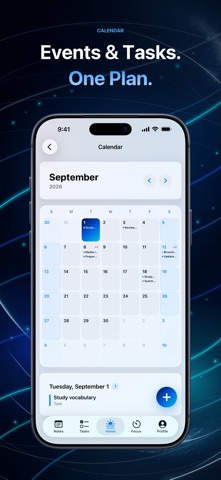
iFocus Plus brings tasks, events, notes, and focus sessions together in one clear, thoughtfully designed app for iPhone and iPad. If you’d like, it can also show your existing Apple Calendar events and Reminders in the same overview. You’ll see what’s coming up without constantly jumping between apps.
Whether you’re capturing a quick thought, planning your week, or settling into one focused session, iFocus Plus keeps the next step visible without getting in your way.
PLAN WITH CLARITY
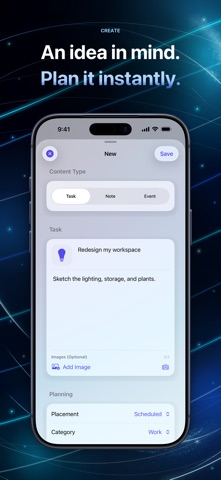
• Create tasks and events with dates, times, priorities, tags, reminders, icons, and images. • View your iFocus Plus items, Apple Calendar events, and Reminders together across day, week, and month views. • Find what you need with an inbox, search, filters, favorites, archive, and trash.
Reminders are scheduled as local notifications on your device. iOS controls whether and when they are delivered.
FOCUS ON ONE THING
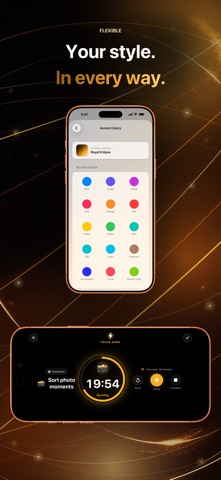
• Choose between a Pomodoro timer and a stopwatch. • Link your timer to an open task. • Enter a minimalist full-screen focus mode when it’s time to give one thing your full attention.
CAPTURE WHAT MATTERS
• Organize notes in custom groups. • Add images, icons, or emoji, and pin important ideas. • Search titles and text instead of digging through pages.
YOUR DAY, RIGHT ON YOUR SCREEN
Today, To-dos, and Notes widgets show selected current content on the Home and Lock Screens. Supported Lock Screen widget formats can also appear in StandBy through iOS; iFocus Plus does not provide a separate StandBy interface. Rectangular widgets show up to three relevant items. Personal titles and note text are marked as private for iOS. Your iOS privacy setting decides whether they remain readable while the device is locked.
People rate it
Sign in to rate this app. Honest is what counts.
No ratings yet. Tried it? Be the first to rate it.