
IKI SKY
Not claimedIKI SKY checks the network you are connected to and explains, in plain words, what you…
By VIKTORI CO MANAGEMENT OOD · Utilities



In short
IKI SKY checks the Wi-Fi network your device is connected to and gives a verdict (Protected, Worth a look, Unsafe or Dangerous) with the reasons behind it. It is aimed at people using public Wi-Fi in cafés, hotels, airports and malls. It stands out for flagging possible evil twin attacks by recognizing the hardware behind networks you have marked as trusted.
Summary by Debuts, based on the App Store listing.About
IKI SKY checks the network you are connected to and explains, in plain words, what you are risking right now.
Public Wi-Fi at a café, hotel, airport or shopping mall all looks the same: the Wi-Fi icon won't tell you whether the network encrypts your traffic or whether someone has cloned a familiar access point. IKI SKY shows you.
NETWORK VERDICT One look at the main screen tells you how safe your connection is: Protected, Worth a look, Unsafe or Dangerous. Below the verdict you'll see exactly what was found and why it matters.
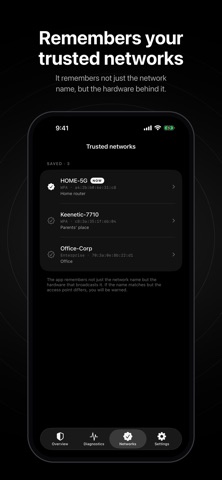
ENCRYPTION CHECK • Open networks without a password and obsolete WEP are flagged as dangerous • WPA/WPA2/WPA3 and enterprise encryption come with a clear note on what they protect against — and what they don't ACCESS POINT IMPERSONATION ALERTS Mark your home and work networks as trusted. The app remembers not just the network name but the hardware that broadcasts it. If a familiar name is suddenly broadcast by a different device, you'll see a warning — that's what an "evil twin" attack looks like, when someone else's access point copies the name of a network you trust.
INTERNET DIAGNOSTICS Five checks: network link, name resolution (DNS), secure connection, public Wi-Fi sign-in page and response latency.
RECOMMENDATIONS Specific advice for the current network — such as turning on a VPN or postponing banking — plus general measures you set up once that work everywhere.
CONNECTION DETAILS Link type, network name, encryption, access point address, local IP address, subnet size and whether a VPN tunnel is active.
PRIVACY • No account, no sign-up • No analytics, no ads, no trackers • Trusted networks and settings are stored only on your device • Location access is needed only because iOS reveals the Wi-Fi name and security type solely to apps that have it. Your location is never stored or sent anywhere
It doesn't encrypt or block anything. It helps you assess the risk and tells you what to do — the decision stays with you.
People rate it
Sign in to rate this app. Honest is what counts.
No ratings yet. Tried it? Be the first to rate it.
More Utilities apps
Best new Utilities apps this week Vodoalarm: vodostaji BiHVodoalarm javlja kad tvoja rijeka naglo raste, pa ne moraš stalno gledati vodostaje
 Rokey: Romanian KeyboardType Romanian without worrying about diacritics
 Vibe Island: AI Agent MonitorVibe Island is a command center for the AI coding agents running on your Mac
 Private AuthenticatorPrivate Authenticator keeps your two-factor authentication codes on your own Apple…
 Photo Clean: Photo CleanupA crowded camera roll?
 Songbird AlarmWhat if the morning didn't have to start with a loud noise?