
JoinSound - Merge Audio Files
Not claimedJoin audio files into one, in the order you want
By mongdaewon · Music and audioWhy we expect it: A clear, focused audio joining tool with a strong on-device privacy promise and thoughtful features for iPhone users.



About
Join audio files into one, in the order you want. Trim each one, then save as M4A, MP3 or WAV. Simple, and your files never leave your iPhone.
JoinSound does one thing: it puts recordings and songs back to back and saves them as a single file. Pick audio files, or use the share sheet in another app and choose JoinSound. Drag to reorder, trim the start and end of each file or keep only the parts you need, then listen to the whole join and save.
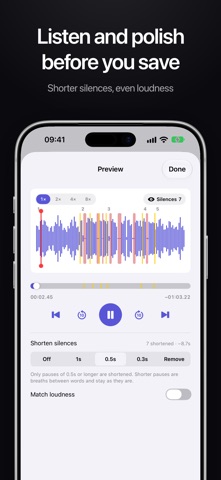
WHAT YOU CAN DO • Join audio files in the order you choose, and drag to reorder • Trim each file on its waveform, or keep several parts of one file • Play any file right in the list, and tap the waveform to jump • Preview the whole join before saving, with marks where files meet • Match loudness, so quiet and loud recordings sound even • Shorten long silences, even the ones across a join • Save as M4A, MP3 or WAV, then share or save the file • Matching files join to M4A without re-encoding, so quality stays the same • Bring audio in from other apps with the share sheet
PRIVATE BY DESIGN Everything happens on your device. Nothing is uploaded, there is no account and there are no ads.
FREE Join 2 audio files with up to 2 parts each, match loudness and save as M4A, free.
JoinSound Plus (one-time purchase, yours forever) • Join as many audio files as you like • Unlimited parts per file • Save as MP3 and WAV • Shorten silences • Share with your family (up to 6)
Works on iPhone and iPad.
People rate it
Sign in to rate this app. Honest is what counts.
No ratings yet. Tried it? Be the first to rate it.