
JulianBar
Not claimedJulianBar puts the Julian date and the ISO week number in your Mac's menu bar, so you…
By Luis Vinicius Ribeiro Pinto · UtilitiesWhy we expect it: A focused, well-explained menu bar utility that solves a real niche problem for ERP and JDE users.

About
JulianBar puts the Julian date and the ISO week number in your Mac's menu bar, so you never have to work it out or look it up again.
If you work with JD Edwards EnterpriseOne, AS/400 or IBM i systems, logistics schedules, manufacturing calendars or anything else that counts days as CYYDDD or DDD, you already know the pain: every date in the system is a Julian number, every date on your calendar is not. JulianBar closes that gap with a single glance.
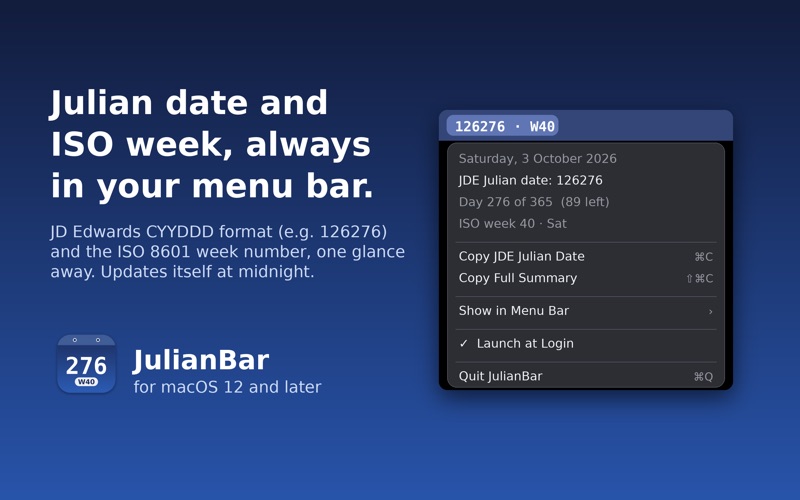
WHAT YOU SEE • The JDE Julian date (for example 126276 for 3 October 2026) and the ISO 8601 week number, right next to the clock • Choose to show both, just the Julian date, or just the week number — your choice is remembered
WHAT'S IN THE MENU • Today's full date • JDE Julian date — click it (or press ⌘C) to copy it • Day of year and days remaining • ISO week number and weekday • Copy a one-line summary of everything • Launch at Login • Quit
DETAILS THAT MATTER • Updates itself at midnight, after sleep, and when the clock or time zone changes • ISO 8601 weeks: weeks start on Monday, week 1 contains the first Thursday of the year — the standard used across Europe and in most ERP systems • Lives only in the menu bar: no Dock icon, no windows, no clutter • No account, no network access, no analytics, no data collected — ever • Native Swift, tiny and fast
JulianBar is a focused, single-purpose utility. It does one thing and stays out of the way.
People rate it
Sign in to rate this app. Honest is what counts.
No ratings yet. Tried it? Be the first to rate it.