
KeepSpace: Free Up Storage
Not claimedKeepSpace helps you free up space on your iPhone with peace of mind
By Tsuyoshi Ishimaru · Utilities



About
KeepSpace helps you free up space on your iPhone with peace of mind. It starts with methods you can undo, and before anything that can't be undone, it shows you exactly where the safe line is and waits for your confirmation.
• CHOOSE BY HOW SAFE IT IS KeepSpace looks through your iPhone first, then shows how much each step can free up. 1. Offload to free up (fully reversible): remove on-device copies of files that are stored in iCloud Drive. It also shows you how to offload apps you rarely use. 2. Shrink to free up (content stays): convert screenshots to HEIC, compress videos, turn Live Photos into still photos. The originals can be recovered for 30 days. 3. Delete to free up (recoverable for 30 days): identical photos, similar photos, blurry photos, old screenshots, duplicate files and old large files.
• NOTHING IS DELETED WITHOUT YOU Check what will be freed and how much before anything happens. Deleted items stay in Recently Deleted for 30 days, and History shows you how to get them back.
• YOUR MEMORIES ARE PROTECTED Favorites, recent photos, photos with people, and photos from trips and events are protected from the start. Add albums, periods, folders and file types to your Safe List.
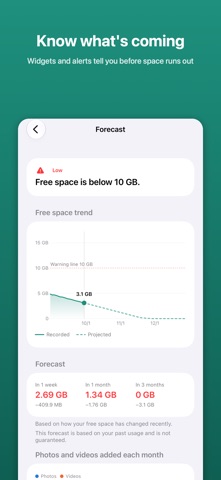
• SEE WHAT'S COMING KeepSpace records your free space and forecasts where it's heading. Before an iOS update, a trip or a long video shoot, check whether you'll have enough room. Widgets and alerts let you know before space runs low.
• PRIVACY Photos and files are analyzed entirely on your iPhone and never sent to a server. No account, no ads, no usage tracking. Only when checking the size of an iOS update does KeepSpace send your device model and iOS version to Apple.
• PRICING Download for free and use every feature to free up a total of 1 GB. To free up more, make a single in-app purchase — one time, no subscription. Storage overview, forecast, widgets, alerts, Prepare and Safe List stay free forever.
Amounts are estimates. iOS may take some time before freed space shows up.
People rate it
Sign in to rate this app. Honest is what counts.
No ratings yet. Tried it? Be the first to rate it.