
Kept: Screen Time Limits
Not claimedKept helps you spend less time on the apps that eat your day
By Wade Bruce · ProductivityWhy we expect it: A clear, well-explained screen time app with thoughtful privacy, transparent escape routes, and a genuinely useful limit system.


About
Kept helps you spend less time on the apps that eat your day. Pick one app, or up to five, and give each one a daily limit. Kept checks in while you use it. Everything stays on your phone, and there are no ads.
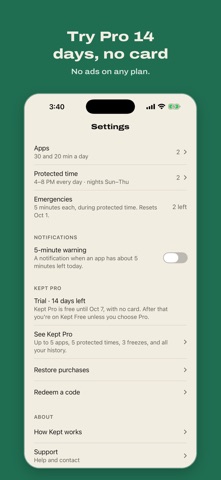
HOW IT WORKS • Pick your apps. You choose individual apps in Apple's own picker. Kept doesn't block whole categories, and Phone, Messages, alarms, and any app you don't pick are never blocked. • Set a daily limit of 15, 30, 45, or 60 minutes, or your own number. Under its limit, the app opens as usual. After every 5, 10, or 15 minutes of use (you pick), Kept checks in and asks "Keep going?" • When the limit is used up, the app stays blocked until midnight. You can get more time inside Kept. It costs a freeze if you have one. If you don't, it costs your streak and a short wait. • Protected time. Set hours when your limited apps are blocked, like family time from 4 to 8 PM. While it's on, an emergency is the only way through. You can turn one off for a day when it doesn't fit, and it comes back on at midnight. • Streaks and freezes. Every day you stay within your limits adds a day to your streak. Every 7 days you earn a freeze, which gives one app another round of today's limit.
PRIVACY AND WAYS OUT • There's no account, sign-in, analytics, or tracking. Your Screen Time data stays on your iPhone. Apple gives Kept tokens in place of app names, so Kept never sees your apps' names as text. • Kept checks its own blocks each time you open it. If Screen Time access was turned off, Kept tells you and shows you how to fix it. • Kept sends one notification at most: an optional 5-minute warning before a limit. It's off until you turn it on. • Turn Kept off in Settings and everything unblocks right away. The How Kept works page lists each way out and what it costs.
FREE ON EVERY PLAN Emergencies (5 minutes, 3 a month, during protected time), turning Kept off, the protection check, restore, and diagnostics.
KEPT FREE AND KEPT PRO Every new install gets all of Kept Pro free for 14 days. The trial runs inside the app. You don't add a payment method or sign up, and nothing is charged when it ends. After 14 days Kept keeps working as Kept Free, with 2 limited apps, 1 protected time, 1 freeze, and 7 days of history. If you set up more than that, you choose what stays, and the rest is saved for later.
Kept Pro raises that to up to 5 limited apps, up to 5 protected times, up to 3 freezes, and your full history.
• Kept Pro Monthly: $2.99 per month • Kept Pro Yearly: $19.99 per year • Kept Pro Lifetime: $49.99, a one-time purchase
Prices are in US dollars and may vary by country. Monthly and Yearly are auto-renewing subscriptions. Payment is charged to your Apple Account when you confirm the purchase. A subscription renews automatically unless auto-renew is turned off at least 24 hours before the end of the current period, and your account is charged for the renewal within the 24 hours before the period ends. You can manage or cancel any time in iOS Settings → your name → Subscriptions, or in Kept under Settings → Kept Pro → Manage subscription. Lifetime is paid once and never renews. Family Sharing is on for all three.
GOOD TO KNOW Kept uses Apple's Screen Time and needs iOS 17 or later. iOS enforces the limits. You can turn off Kept's Screen Time access in iOS Settings at any time. Kept can't stop that, but it will tell you it happened.
Kept is made by one person, Wade Bruce. Questions and bug reports go to kept@brucelabs.io.
Terms of Use: https://kept.brucelabs.io/terms Privacy Policy: https://kept.brucelabs.io/privacy Support: https://kept.brucelabs.io/support
People rate it
Sign in to rate this app. Honest is what counts.
No ratings yet. Tried it? Be the first to rate it.