
Kevin: Study Planner
Not claimedYour phone has feelings about your assessments
By Sol Crisp · EducationWhy we expect it: A clever, well-described study planner with a memorable persona, clear privacy promises, and transparent subscription terms that makes its value easy to grasp.





About
Your phone has feelings about your assessments.
Kevin is your iPhone, awake. Show him your assessment task sheet and he plans every study block. Ignore him, and he gets steadily angrier until your distraction apps lock.
SHOW HIM YOUR ASSESSMENTS Photograph a task sheet, screenshot the school portal, or drop in a PDF. Kevin reads it on your phone, finds the due date and weighting, and you check what he found before anything is added.
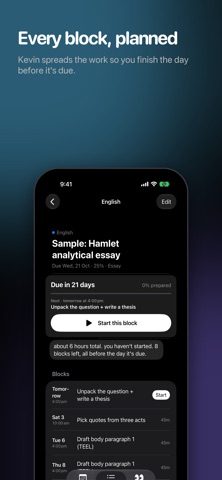
HE PLANS EVERY BLOCK Kevin works out how long each task needs and spreads it across your free time, finishing the day before it's due. Sick? Busy? Text him "i'm sick today" or "move maths to tomorrow" and he replans.
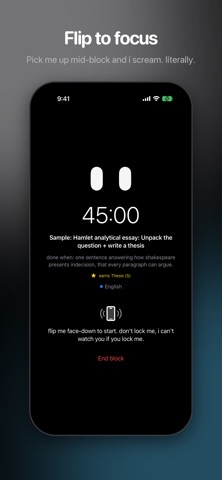
HE MAKES SURE YOU DO IT • Nudges before and after every block, in his own voice • His eyes in your Dynamic Island while you work • Flip your phone face-down to focus. Pick it up and he screams. • Ignore a block and your chosen distraction apps lock until you start
HE PLAYS FAIR • You choose how strict he is: Nag, Yell or Lock • The emergency override always works (it costs your streak) • One guilt-free rough-day pass every week • He's angry at procrastination, never at you
KEVIN+ Kevin asks you a few sharp questions about your task sheet, then writes a real plan from the marking rubric: time spent where the marks are, a "done when" for every block, checkpoints and school-only steps. Plus a report card every Sunday. Kevin+ is an auto-renewing subscription. Payment is charged to your Apple Account and renews unless cancelled at least 24 hours before the end of the period. Manage or cancel in Settings → your name → Subscriptions.
PRIVATE BY DEFAULT Your plan, your documents and your Screen Time choices stay on your phone. Kevin can't see what you do inside apps. Cloud planning only happens if you allow it.
Terms: https://solcrisp.org/kevin/terms Privacy: https://solcrisp.org/kevin/privacy
People rate it
Sign in to rate this app. Honest is what counts.
No ratings yet. Tried it? Be the first to rate it.
More Education apps
Best new Education apps this week FluencyToolShadow a native Japanese sentence, hear your own voice back, and get scored.
 YoMoo: Read & Shadow JapaneseYoMoo turns real Japanese writing into graded reading practice: news articles, Wikipedia…
 KeyswingLearn music notes, rhythm and piano through playful practice in a magical forest.
 Uncle Math Homeschool - 6 to 8No Math Fear, Uncle Math Is Here
 Malachi SpeaksMalachi Speaks gives a voice to people who don't use speech
 SelvarisWatch evolution unfold in real time – on an entire planet