
Key Press Counter
Not claimedKey Press Counter records one thing: how many keys you press in each hour of the day
By Gianluca Zompa · UtilitiesWhy we expect it: A clear, privacy-first idea with a well-explained value and helpful screenshots, though its audience is fairly niche.



About
Key Press Counter records one thing: how many keys you press in each hour of the day. Not which keys, not in which app, not what you write. Just a number per hour. And that single number, kept day after day, is enough to tell you things about your day that you cannot see while you are in it.
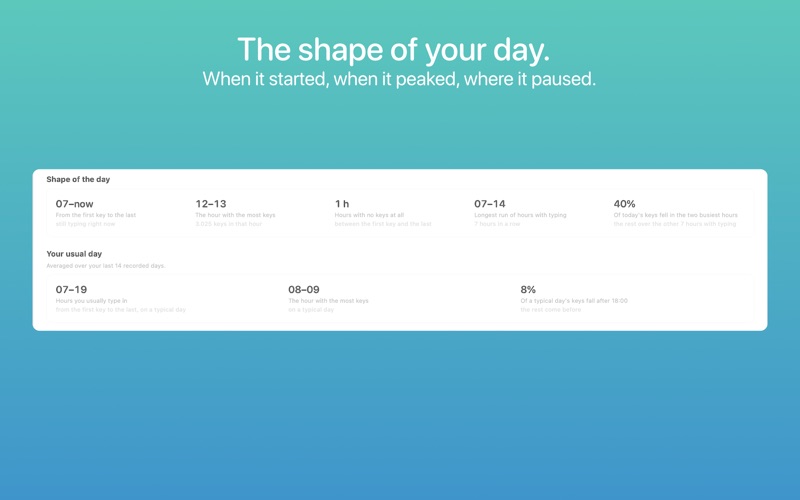
WHAT ONE NUMBER CAN SHOW Every day gets 24 counts, one per hour. From those the app works out where your day actually went: - When you started and when you stopped, from the first key to the last - Which hour carried the most keys, today and on a typical day - How many hours in between had no typing at all, and the longest run without a gap - How much of the day landed in its two busiest hours - How today compares with where a typical day of yours is at this same time - The last 7 days and the last 30, and how different a weekend day is from a weekday
None of it is a target. The app never says you are ahead or behind, never suggests you type more, never awards anything. It shows the shape of the day and leaves the reading to you.
PRIVACY BY DESIGN It only counts. It never reads which keys you press, which app you use or what you write, just how many and when. Key Press Counter asks macOS one question: how many keys have been pressed so far. From that total it works out how many belong to the current hour, and writes the result down. That is everything it knows: a count and a date. No network access. Everything stays on your Mac.
LIGHT ON YOUR MAC Key Press Counter is built to stay light. Once a second it asks the system for the current count, and that is the whole job. It keeps a small, fixed amount of memory and never touches the network. The only trace of it is the number in your menu bar.
HOW IT WORKS The daily total sits in your menu bar. Click it for today's hours drawn over your typical day, once there is enough history, and one reference figure. Open Statistics for the full picture, which fills in as days accumulate: hourly from day one, weekly after two days, monthly after a week.
Suggestions, questions, feedback: support@createbycoding.it
People rate it
Sign in to rate this app. Honest is what counts.
No ratings yet. Tried it? Be the first to rate it.
More Utilities apps
Best new Utilities apps this week Drainly: Speaker CleanerMuffled speaker after a splash, rain, or a sweaty workout?
 Photo & PDF Resize: KBFile too large to upload?
 Arvectum Proxy LauncherArvectum Proxy Launcher is a network utility that routes your iPhone through a proxy you…
 Vodoalarm: vodostaji BiHVodoalarm javlja kad tvoja rijeka naglo raste, pa ne moraš stalno gledati vodostaje
 FairAuth: AuthenticatorFairAuth creates the codes for two-step verification on iPhone and iPad
 Polarglow: Aurora AlertsKnow tonight's chance of seeing the aurora where you are, and never miss a storm night