
Kigencho: Expiry Date Tracker
Not claimedYou bought it, forgot it, and found it after the date had passed
By Ryosuke Takashita · Lifestyle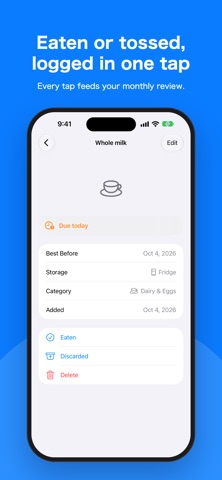

About
You bought it, forgot it, and found it after the date had passed. Kigencho keeps track of best-before and use-by dates so that happens less often.
SCAN TO ADD Point the camera at the date printed on a package. On-device AI reads the product name and the date, so you don't type them. You can check and correct the result before saving.
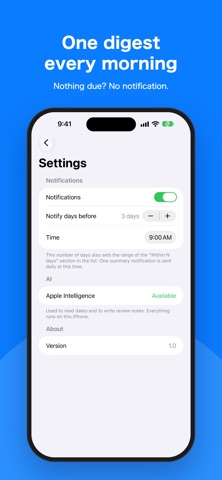
ONE REMINDER EACH MORNING A single notification lists the food that expires today and the food that expires in the next few days. You choose the time and how many days ahead to be warned (1 to 7).
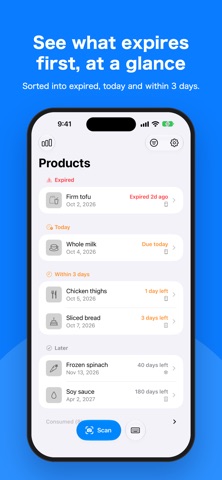
SEE WHAT TO EAT FIRST The list is grouped into Expired, Today, Within 3 days and Later. Filter by fridge, freezer or pantry.
MONTHLY REVIEW Mark each item as eaten or thrown away. Kigencho adds up each month: your waste rate, a breakdown by category and the items you threw away, with a short AI comment on the pattern.
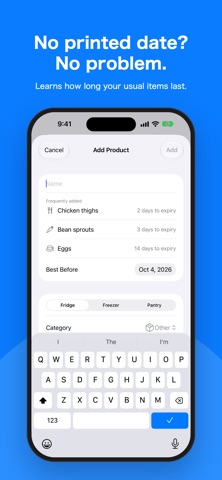
FAST MANUAL ENTRY Items you add often appear as suggestions. Pick one and the name, category and storage place are filled in. You can attach a photo too.
YOUR DATA STAYS ON YOUR IPHONE Label reading and review comments run entirely on your iPhone. There is no account, no ads, and your photos and records are never sent anywhere.
GOOD TO KNOW - Camera scanning and AI comments need an iPhone that supports Apple Intelligence, with Apple Intelligence turned on. Without it, manual entry, reminders and the monthly totals still work. - Scanned results can be wrong. Check them before saving.
People rate it
Sign in to rate this app. Honest is what counts.
No ratings yet. Tried it? Be the first to rate it.