
KinReady: Family Health Record
Not claimedKinReady keeps the records of the people you look after — an aging parent, a partner, a…
By ANGEL DARIO MARTINEZ · Health and fitness


About
KinReady keeps the records of the people you look after — an aging parent, a partner, a child, or yourself — in one place, and turns them into an emergency card anyone can read at a glance.
ONE PAGE FOR AN EMERGENCY Everything you record goes onto the Emergency Card: allergies and how severe they are, active medications and doses, conditions, the care team, insurance, and directives such as a DNR. It opens in one tap, even without a connection, and you can share or print it as a PDF for a paramedic, a school nurse or a babysitter. The Emergency Card is always free.
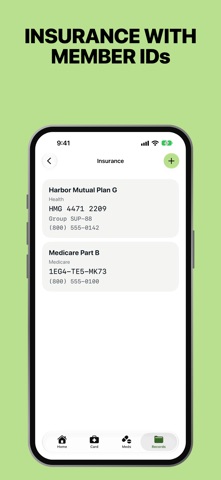
EVERYTHING IN ONE PLACE • Medications, with a switch for what prints on the card. Stopped medications stay in the history a doctor may ask for. • Allergies and conditions • Insurance, with member IDs and claims numbers • Directives, such as a DNR, a healthcare proxy or a power of attorney, and where the originals are kept • Doctors, pharmacies, schools and authorized pickups • Appointments and documents • Who to call at a bank or an investment firm, and where the paperwork lives
SCAN INSTEAD OF TYPING Take a photo of a pill bottle or an insurance card, and KinReady fills in what it can read. You check every field before anything is saved. The text is read on your iPhone; nothing is uploaded.
KNOW WHAT'S COMING UP Home shows what needs attention: a document that has expired or expires soon, a directive still in progress, the next appointment. Turn on reminders, and KinReady tells you before a document expires and before an appointment.
SHARE WITH FAMILY Invite a sibling, a partner or a caregiver through iCloud sharing, and choose for each person whether they can edit. Everyone sees the same records and the same emergency card, and each record can say who added or last changed it. You can remove someone or stop sharing at any time. The people you invite don't need to buy anything.
PRIVATE BY DESIGN • Your records are kept on your iPhone and in your own iCloud account. • KinReady has no server and no account of its own. Nobody at KinReady can see your records. • No analytics, no advertising and no tracking. • There's no place for full account numbers, passwords or PINs.
YOURS TO KEEP Export everything — every record, every scan and the emergency card — into one file whenever you like. When someone should keep their records themselves, like a child turning 18, hand them over.
FREE, AND KINREADY FAMILY Free forever: one person's records, the Emergency Card, and a full export of everything. KinReady Family adds records for more than one person, sharing with family, document scanning, and a monthly copy in iCloud Drive. Buy it once, or subscribe yearly with a 14-day free trial. Both work with Family Sharing.
KinReady is a place to keep records. It doesn't give medical advice.
Terms of Use: https://www.apple.com/legal/internet-services/itunes/dev/stdeula/ Privacy Policy: https://kinready.app/privacy
People rate it
Sign in to rate this app. Honest is what counts.
No ratings yet. Tried it? Be the first to rate it.
More Health and fitness apps
Best new Health and fitness apps this week Orbit: Self-Care Habit TrackerYour healthy choices deserve more than a checkmark
 Wellbeing: Digital WellbeingBillions of people spend more time scrolling than they want to
 Finn: Baby TrackerFinn is the calm, quick way to track your baby's feeds, sleep, diapers and pumping — and…
 Padel Score Tracker: PacoKeep padel score on your Apple Watch without looking at it
 DeskFlow: Workday MovementYou don't need another workout app
 Vigia: meds & family healthVigia keeps your health and your family's in order: a child, a parent, a partner