
Kinwatch
Not claimedKinwatch watches over someone living alone and tells you the moment something looks wrong
By K12 Ventures Foundation, Inc. · Health and fitnessWhy we expect it: Its privacy-first radar design and clear, caring purpose make this a strong debut for worried families.


In short
Kinwatch is a health-fitness app that pairs with a mains-powered radar sensor to watch over a person living alone. It shows which rooms someone is in, daily activity, and alerts for detected falls, long periods of stillness, or an offline sensor. The standout point is that the sensor uses no camera or microphone, only presence, fall and brightness data.
Summary by Debuts, based on the App Store listing.About
Kinwatch watches over someone living alone and tells you the moment something looks wrong.
A small sensor in the room uses 60 GHz radar to notice a fall. There is no camera and no microphone, and there is nothing to wear or charge. It works in the dark, and it keeps working on the night the pendant is left on the nightstand.
WHAT YOU SEE • One clear answer on the home screen: "Mom is Safe", with when she last moved • Which rooms someone is in right now • Daily activity, hour by hour, so a change in routine is visible early • A 30-day history of falls, night-time movement and unusually quiet stretches
ALERTS • A fall raises a full-screen alert the moment it is detected • A warning when nobody has moved for hours during the daytime • A warning when a sensor goes offline, because a sensor that stopped reporting protects nobody • Call the person nearby straight from the alert, and tap "I'm on it" so anyone else watching knows it is handled
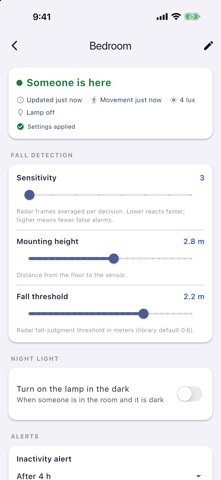
SET UP IN MINUTES • Plug the sensor in and the app finds it over Bluetooth • Pick your Wi-Fi network, name the room, and the sensor pairs itself • Adjust sensitivity, mounting height, night hours and the night light from your phone • Add a sensor per room: bedroom, bathroom, hallway
PRIVACY The sensor has no camera and no microphone. It reports whether someone is present, whether a fall was detected, and how bright the room is. No images or audio exist to leave the house. You can delete your account and erase your sensors' history from inside the app at any time.
REQUIRES A KINWATCH SENSOR The app needs at least one Kinwatch mmWave sensor on a 2.4 GHz Wi-Fi network in the home you are monitoring. Without a sensor the app has nothing to show.
PLEASE READ Kinwatch is an assistive tool. It is not a medical device and not an emergency response service. It can miss falls, and it can report a fall that did not happen. Alerts depend on mains power, the home's Wi-Fi, internet service and notification delivery, so they can be delayed or not arrive at all. Never rely on it as the only way you protect someone at risk of falling. In an emergency, call your local emergency number.
Only monitor someone who knows about it and agrees to it.
People rate it
Sign in to rate this app. Honest is what counts.
No ratings yet. Tried it? Be the first to rate it.
More Health and fitness apps
Best new Health and fitness apps this week Orbit: Self-Care Habit TrackerYour healthy choices deserve more than a checkmark
 Wellbeing: Digital WellbeingBillions of people spend more time scrolling than they want to
 Court OrderCourt Order sorts out who plays next, so nobody has to
 Finn: Baby TrackerFinn is the calm, quick way to track your baby's feeds, sleep, diapers and pumping — and…
 Padel Score Tracker: PacoKeep padel score on your Apple Watch without looking at it
 DeskFlow: Workday MovementYou don't need another workout app