
Kodigo: Shows Movies Watchlist
Not claimedKodigo keeps track of what you are watching: what you have seen, what is waiting, and…
By Laura Dunlap · GamesWhy we expect it: Its description clearly explains strong value for TV and film fans, with offline use and easy imports from other trackers.


About
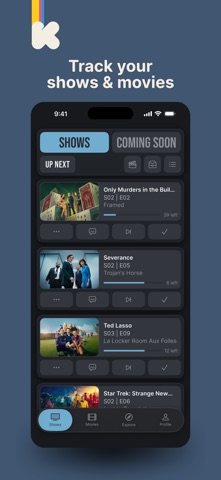
Kodigo keeps track of what you are watching: what you have seen, what is waiting, and when the next episode lands.
WHAT IT DOES
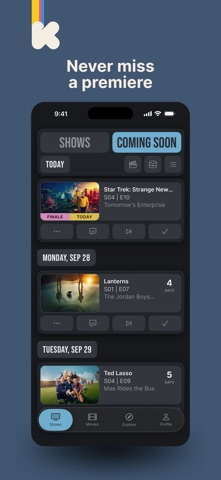
• Up Next — every show you are partway through, in one queue. Check an episode off in a tap. • Coming Soon — what is airing next, counted down to the day. • Films beside shows, in the same library rather than a second app. • Where to watch: which services carry a title where you are. • Reminders when an episode lands, when a season premieres, when a film opens, and a weekly digest. Each one turns off on its own. • Home screen widgets for Up Next, Coming Soon and films to watch, plus a search card. Tick an episode off without opening the app. • Ask Siri what is next to watch, or mark an episode off without unlocking. • Works on a plane. Your library, your posters and your episode lists are on the device, so checking something off needs no signal.
KEEP YOUR OWN RECORD
• Rate a show, a film or a single episode, and say how it left you. • Notes on anything you want to remember. • Tags and lists you name yourself. • Watch history you can read back day by day. • Stats worth reading: hours watched, what you finish and what you drift away from, the genres and moods you actually return to.
BRING YOUR HISTORY WITH YOU
Years of watching should not stop at the old app. Export your data from the tracker you are leaving, hand the file to Kodigo, and it reads what is in there: episodes, films, ratings, favourites and watchlists. It tells you exactly what came over, and what it could not place.
It reads the plain CSV and JSON files these exports come as, and the backup file Kodigo writes itself.
And when there is no file to hand — the old app closed, or the export never came — Add in Bulk is the way back: find your shows, say where you got to in each, and stop whenever you have had enough.
YOUR LIBRARY IS YOURS
Not a phrase — a set of things you can actually do.
• It lives on your phone. No account is needed to use Kodigo at all, and with sync off nothing you track leaves the device. • Export everything to a plain text file whenever you like, or email yourself a copy. It is readable with any text editor, it is not a format we invented to keep you here, and any copy of Kodigo can take it back in. • Sync, if you want it, keeps one library across your devices. It is off until you turn it on, and turning it off offers to delete the server's copy. • Close your account from inside the app. The sign-in, the copy of your library and your profile are deleted straight away; backup copies are gone within 30 days. • Erasing your library does not touch a backup file you have already saved. Those are yours and they stay where you put them. • Lookups to TMDB and TVmaze carry no account or device identifier, and nothing about you. • No ads. No analytics. No tracking of any kind. Nothing about what you watch is sold or shared, and nothing leaves your phone unless you turn sync on.
People rate it
Sign in to rate this app. Honest is what counts.
No ratings yet. Tried it? Be the first to rate it.