
Kolorist: Color Palettes
Not claimedKolorist is a colour tool for designers and architects on iPhone, iPad and Mac
By Eivind Arnstein Johansen · Photo and videoWhy we expect it: A strong, well-documented professional tool for designers and architects, with clear value across iPhone, iPad and Mac.



About
Kolorist is a colour tool for designers and architects on iPhone, iPad and Mac. Build palettes across colour spaces, turn them into design systems, check contrast and colour vision, see colours in the light where they will be used – and get them into the tools you already use.
FROM PALETTE TO DESIGN SYSTEM • Roles for accent, neutral and status give colours for light and dark mode, with and without increased contrast – your brand colour is kept wherever it meets the requirements • See the colours on buttons, fields, switches, alerts and tabs, with the contrast for each colour pair and the WCAG requirement • Your own roles, such as info, categories or offers • Tone scales with the same contrast for every hue, right in Studio • Export as colour sets for app development, design tokens and CSS with light and dark mode – or share the design system as a link
EVERY COLOUR SPACE • Edit in OKLCH, OKLab, CIE LCH, CIELab, HSB, HSL, RGB and CMYK • Display P3 side by side with sRGB, Adobe RGB, CMYK or any ICC profile – mapped, never clipped • Enter CMYK or RGB in the profile they will be used in, and get clean CMYK values • Type hex or CSS colours
COLOUR LIBRARIES, ICC PROFILES AND FILAMENT • Import your own colour charts in ASE, ACO or ACB with named tones • Filament colours for 3D printing: more than 2,200 colours from 150 manufacturers, most of them measured – find the nearest filament • Your own ICC profiles, synced through iCloud Drive
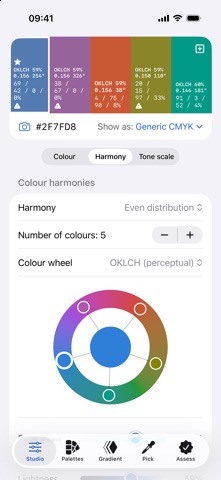
GRADIENTS, TONES AND HARMONIES • Gradients in equal perceptual steps in OKLab, with lighter and darker rows and CSS gradients • Harmonies from monochromatic and tone path to triad and square, on OKLCH, CIE LCH, Hering, Goethe, HSL or RYB colour wheels
CONTRAST AND COLOUR VISION • Contrast check by WCAG 2.2 or LRV, with auto-fix that adjusts the colour until it passes • Text contrast and text colours for whole palettes • Contrast between surfaces for buildings and interiors: LRV difference, Weber or Michelson – in the chosen light too • See palettes with protan, deutan and tritan deficiencies and achromatopsia – and which colours become hard to tell apart • The difference between two colours with ΔE2000, ΔL*, ΔC* and Δh
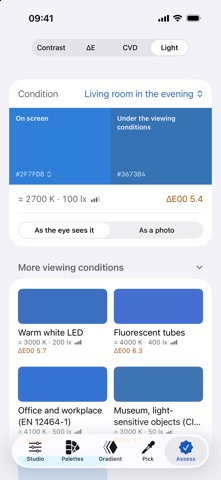
LIGHT AND COLOUR MEASUREMENT • See colours and whole palettes in your own and standard viewing conditions • Measure the light with the camera, and compensate the colours you pick with a grey card or reference card (beta)
PICK COLOURS • Camera and photos, right from the colour fields where you need the colour • Colours you pick are kept until you save them
APPLE INTELLIGENCE ON DEVICE • From value words to a palette, grounded in a knowledge base of more than a hundred colour concepts • Name colours and get a critique of your palette Everything runs on device. Without Apple Intelligence, palettes are built straight from the knowledge base.
SHARE, SAVE AND EXPORT • Share colours, palettes, gradients and harmonies as links – recipients without the app see them in their browser • Save as ASE, ACO, design tokens, CSS, SwiftUI, GPL, SVG, hex and PDF • Copy colours and gradients straight into design, layout and presentation apps – or as RGB values for CAD, BIM and video and linear values for 3D apps • Print palettes and palette groups on A4 in CIELab
PALETTES AND ICLOUD Collect colours and gradients in palettes and palette groups, and sync through your own private iCloud.
OPEN ABOUT METHODS The app shows the methods it builds on – OKLab, CIEDE2000, CAM16, WCAG, LRV, ICC and design tokens – with source and explanation.
People rate it
Sign in to rate this app. Honest is what counts.
No ratings yet. Tried it? Be the first to rate it.