
Konsol Remote – Lighting Desk
Not claimedKonsol Remote turns your iPhone or iPad into a remote for your lighting console, so you…
By ONURCAN AYDOGAN · Utilities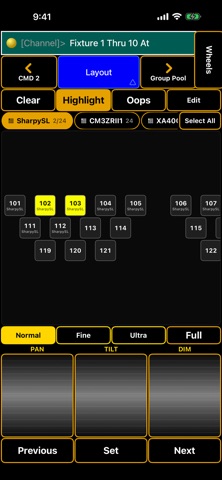


In short
Konsol Remote, Lighting Desk turns an iPhone or iPad into a remote for grandMA2 and grandMA3 consoles, letting lighting operators focus fixtures from the stage. It offers playback faders, a full command keypad, imported layouts, and pan, tilt and dim wheels. One notable detail is that held flash buttons release automatically if the app goes to the background or the connection drops.
Summary by Debuts, based on the App Store listing.About
Konsol Remote turns your iPhone or iPad into a remote for your lighting console, so you can focus fixtures from the stage instead of walking back to the desk.
WORKS WITH grandMA2 and grandMA3 consoles and onPC. grandMA2 connects through the console's built-in web remote; grandMA3 through the free Konsol Remote plugin (linoapps.com/konsol-remote), protected with a PIN.
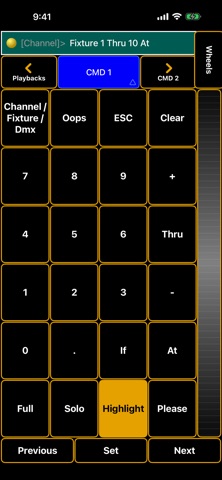
WHAT YOU GET • Playbacks: executor faders with Go / Flash / Off buttons, names, colours and the active cue — 15 at once on iPad • CMD 1 / CMD 2: the full console keypad; keys are sent as real key presses and the command line is mirrored live • Layout: import the layouts you drew on the console (Export Layout) and select fixtures exactly where they sit. Edit freely, with Snap Always • Pan / Tilt / Dim wheels with Normal, Fine and Ultra • Group, Preset and Macro pools, Wheels page • Portrait and landscape, iPhone and iPad, 10 languages
BUILT FOR LIVE WORK • If Wi-Fi drops, the screen stays open and the app reconnects by itself • Held flash buttons are released if the app goes to the background or the connection drops • The screen stays awake while connected
PRICE Your first hour of connected time is free. After that, a one-time purchase unlocks the full version. No subscription, no ads, no account, no data collection. Try without a console: a demo mode lets you explore every screen.
SETUP (once, on the console) Setup → Console → Global Settings → Remotes: Login Enabled, and create a user with a password in User & Profiles Setup.
Konsol Remote is an independent app and is not affiliated with or endorsed by MA Lighting Technology GmbH. grandMA is a trademark of MA Lighting Technology GmbH. During a show, primary control should always stay on the console.
People rate it
Sign in to rate this app. Honest is what counts.
No ratings yet. Tried it? Be the first to rate it.
More Utilities apps
Best new Utilities apps this week Drainly: Speaker CleanerMuffled speaker after a splash, rain, or a sweaty workout?
 Photo & PDF Resize: KBFile too large to upload?
 Arvectum Proxy LauncherArvectum Proxy Launcher is a network utility that routes your iPhone through a proxy you…
 Vodoalarm: vodostaji BiHVodoalarm javlja kad tvoja rijeka naglo raste, pa ne moraš stalno gledati vodostaje
 FairAuth: AuthenticatorFairAuth creates the codes for two-step verification on iPhone and iPad
 Polarglow: Aurora AlertsKnow tonight's chance of seeing the aurora where you are, and never miss a storm night