
Later: Screenshot Brain
Not claimedAsk your screenshots anything
By Mymoney LLC · Productivity





In short
Later: Screenshot Brain is a productivity app for iPhone that reads the screenshots in your camera roll and lets you search them in plain English, sorting them into groups like Places, Travel and Recipes. Most processing stays on the device, and the app flags sensitive screenshots and asks before deleting anything.
Summary by Debuts, based on the App Store listing.About
Ask your screenshots anything. Later reads them on your iPhone and turns them into places, prices, trips and recipes you can search in plain English.
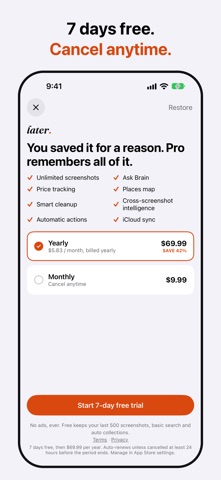
You saved it for a reason. Later remembers all of it.
Later turns the screenshots piling up in your camera roll into a searchable brain: restaurants become a map, wishlists become price alerts, flight confirmations become a trip, recipes become a grocery list. All on your iPhone — most of it never leaves the device.
ASK YOUR SCREENSHOTS Type a question like "what was that restaurant Mike sent me?" and Later finds the answer, with the exact screenshot to prove it. No more scrolling through thousands of photos.
READ THE TEXT IN ANY SCREENSHOT Open a screenshot to read, search, copy or share its text, neatly formatted — or select text right on the image with Live Text.
YOUR BRAIN, ORGANIZED AUTOMATICALLY Later sorts your screenshots into Places, Products, Travel, Food & Recipes, Fitness, Ideas, Conversations, Events, Documents and Memes when you open it or in the background — no filing, no folders.
PRICE TRACKING Screenshot something you're eyeing and Later watches the price. A drop below your target shows up as a notification, not a spreadsheet.
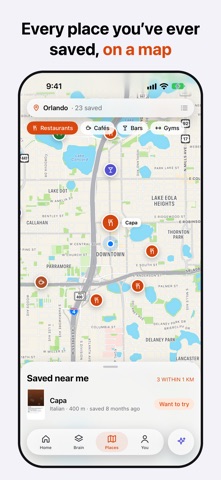
PLACES, ON A MAP Every restaurant, shop and address you've ever screenshotted, ready to browse near you.
TRIP DETECTION Later groups screenshots into a trip automatically — confirmations, ideas, the works — and highlights the cheapest fare among the ones you screenshotted while you're deciding.
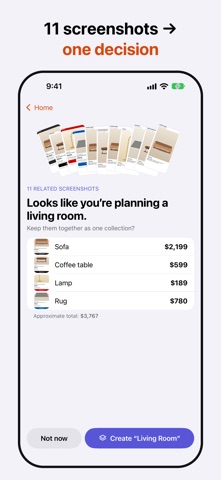
STACKS: NUDGES YOU CONTROL When five or more screenshots point at the same idea (say, a living room), Later notices and offers to bundle them — you decide what happens next.
SMART CLEANUP Later finds screenshots you don't need anymore — expired codes, old boarding passes, screens you never opened again — and asks before anything is deleted. Nothing is removed automatically.
PRIVACY BY DESIGN Screenshot recognition, search and organization run on your iPhone using Apple's on-device frameworks. Later flags screenshots that look sensitive (codes, IDs, private messages) and keeps them on your iPhone. Later Pro's "Ask Brain" and smart classification on devices without Apple Intelligence use Later Cloud, a small server that receives only the text extracted from your screenshots — never the images themselves — to answer harder questions. See our Privacy Policy for the exact detail.
People rate it
Sign in to rate this app. Honest is what counts.
No ratings yet. Tried it? Be the first to rate it.
More Productivity apps
Best new Productivity apps this week ChickMark: Habit TrackerChickMark is a simple habit tracker for routines, goals, and reminders
 Dayflint: One Thing a DayToo many priorities?
- BeginAnywayMorning alarm for hard tasks: set one task, prove you started, build a streak
 DHUDEDHUDE Analityxs es la herramienta de gestión diaria para grupos de restauración y ocio…
 FTC BIOBUZZ Scorer & TrainerBIOBUZZ Scorer is a free, ad-free scorer for the 2026–2027 FTC season, built on…
 Intent - Scroll by ChoiceTake back control of your screen time