
Layfit
Not claimedLayfit places your photos on a fixed-ratio canvas without cropping or stretching them…
By Yoonjae Huh · Photo and video


About
Layfit places your photos on a fixed-ratio canvas without cropping or stretching them, then saves the result as a JPEG.
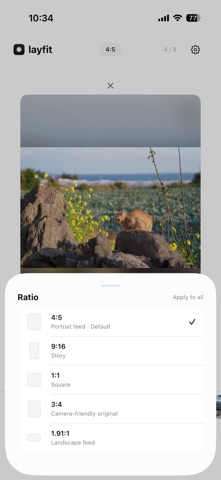
Posting landscape and portrait photos in the same feed or carousel usually means cutting off part of the picture. With Layfit, each photo keeps its original composition and aspect ratio. The leftover space is filled with a blurred copy of the photo, a solid color, or a color taken from the photo itself.
FEATURES
- 4:5 canvas by default, plus 1:1, 1.91:1, 3:4 and 9:16 - Import JPEG, HEIC and PNG photos - Select many photos at once and switch between them with thumbnails - Backgrounds: blur, black, white, edge color, average color and palettes - Per-photo crop, rotation and position - Standard, high and maximum output quality - Saves to your Photos library, with an optional "Layfit Exports" album - Available in English, Korean and Japanese
NOT A FILTER APP
Layfit does not do color grading or face retouching. It focuses on one thing: fitting your photos to the format you post in.
PRIVATE BY DESIGN
Everything is processed on your device. There are no accounts, no sign-in, no uploads, no ads and no tracking.
People rate it
Sign in to rate this app. Honest is what counts.
No ratings yet. Tried it? Be the first to rate it.