
Leave it to buff
Not claimedbuff is a notebook you type into, like a terminal
By Ashwin Thillainatarajan · Productivity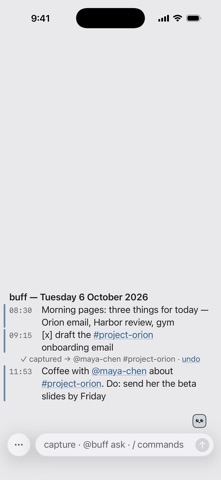



In short
Leave it to buff is a productivity app that works like a terminal-style notebook: you type a line, press Send, and it is filed under today. It suits people who want to tag people and projects, track todos with plain-language due dates, and keep notes as plain markdown files in their own iCloud Drive. One standout detail is that there is no account and no analytics, and the developer never sees the notes.
Summary by Debuts, based on the App Store listing.About
buff is a notebook you type into, like a terminal. Write a line, press Send, and it's filed under today. That's the whole habit.
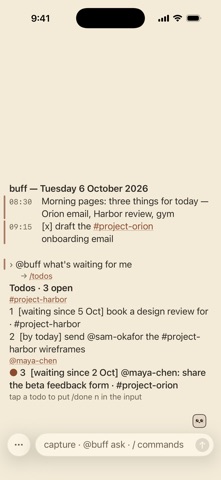
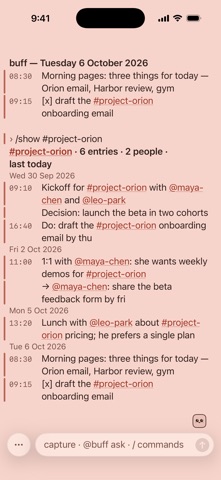
Behind that one box, buff keeps things in order: • Tag people and projects as you write (@jane-doe, #project-name). buff spots names you've used before and offers the tag. • Look back by day, week or month, or see everything about one person or project, by date. • Start a line with "Do:" and it becomes a todo, with due dates in plain words ("by fri"). • Decisions, weekly digests and a tidy-up check, all worked out on your device. • Ask in plain words: "@buff what's waiting for me".
Your notes are yours: • Plain markdown files in your own iCloud Drive (the "Buff notes" folder). Open them in Files, on your Mac, or in any markdown app. • No account, no sign-up, no analytics, no ads. The developer never sees your notes. • Capture from anywhere: the share sheet, Siri ("Add to buff"), Shortcuts, Back Tap or the Action button.
Optional AI: • On supported devices with Apple Intelligence, buff uses Apple's on-device model for plain-language requests and quick answers. • Briefs before a meeting, cleaned-up entries and deeper checks use Claude and need your own Anthropic API key. Your key stays in the Keychain, and the text for that request goes straight from your device to Anthropic.
Two buttons, by design: Send and Options. Everything else is typed or tapped. Type /tour for a one-minute walkthrough.
People rate it
Sign in to rate this app. Honest is what counts.
No ratings yet. Tried it? Be the first to rate it.
More Productivity apps
Best new Productivity apps this week ChickMark: Habit TrackerChickMark is a simple habit tracker for routines, goals, and reminders
 Dayflint: One Thing a DayToo many priorities?
 Fristo CAFMFristo is the app for Fristo CAFM, the facility management software
- BeginAnywayMorning alarm for hard tasks: set one task, prove you started, build a streak
 DHUDEDHUDE Analityxs es la herramienta de gestión diaria para grupos de restauración y ocio…
 Snappy Do ItSix connected modes. One traceable journey.