
Lectern Bible: Read Aloud
Not claimedRead the Bible aloud
By Sangkwun Kang · Education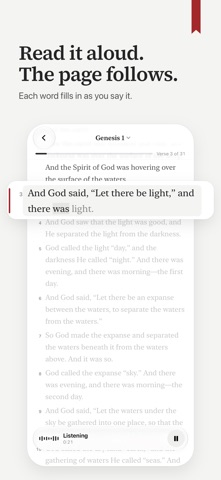



About
Read the Bible aloud. Words fill in as you speak, and the page follows verse by verse. Build a daily habit with reading plans, streaks and progress across all 66 books.
Lectern Bible listens as you read Scripture out loud and moves the page with your voice. Nothing to tap.
EVERY VERSE, IN YOUR OWN VOICE A chapter counts only when you have read every verse aloud. There is no swiping to the end. If the page did not catch a verse, it says so and waits for you to read it again. Tap a verse to read from there: a verse you pass over stays unread, and at the end the page takes you back to it. If a call or an alarm takes the microphone, tap Resume and carry on from the same verse. Stop partway through a chapter and your place is kept.
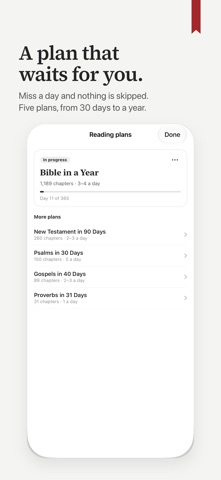
TODAY’S READING IS WAITING Choose a plan and each day’s portion is on the home screen: the Bible in a Year, the New Testament in 90 Days, the Psalms in 30, the Gospels in 40 or Proverbs in 31. Miss a day and the plan waits for you; it does not skip ahead.
A STREAK THAT GROWS A DAY AT A TIME Read a chapter aloud and the day counts. See your week at a glance; a day is not lost until it is over.
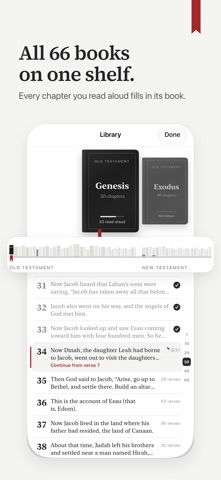
ALL 66 BOOKS ON ONE PAGE Every chapter you read aloud fills in its book, and a ribbon marks the book you are in. One number says how much of the Bible you have read in your own voice.
FINISH A CHAPTER AND SEE IT At the end of a chapter you see how long you read, how many verses, and your streak. Share it as a picture: the chapter on a page, with the ribbon in its place.
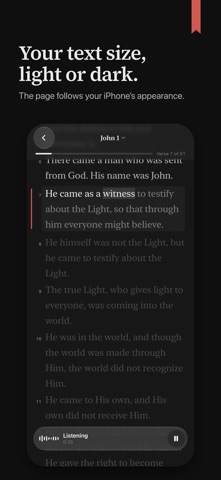
AND THE DETAILS • Pick up where you stopped, at the verse after the last one you read. • Open any book and chapter of the Bible. • The screen stays on while you read aloud. • Set the text to the size you read best. Light and dark follow your iPhone. • The Bible text is on your iPhone. Voice tracking works offline once the speech model has downloaded. • No ads, no account.
YOUR VOICE STAYS ON THE DEVICE Speech is recognized on your iPhone. Nothing you say is recorded or uploaded.
FREE TO START The first three chapters you read aloud are free, even ones you stop partway, and they stay free to read again. Reading the text silently is always free. After that, reading aloud, with its streak, progress and plans, is unlocked by a yearly or monthly subscription or a one-time Lifetime purchase. Subscriptions renew automatically until you cancel in Settings › your name › Subscriptions. There is no trial that turns into a charge.
Scripture is from the Berean Standard Bible (BSB), dedicated to the public domain.
Privacy policy: https://lecternbible.com/privacy Terms of use: https://www.apple.com/legal/internet-services/itunes/dev/stdeula/
People rate it
Sign in to rate this app. Honest is what counts.
No ratings yet. Tried it? Be the first to rate it.