
LED Light Controller – Glow
Not claimedGlow is one beautiful remote for the cheap LED strips and lights around your home —…
By OM SRI ROHITH RAJ YADAV THALLA · Utilities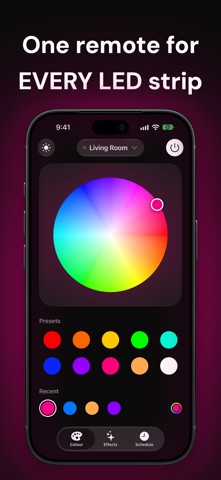


About
Glow is one beautiful remote for the cheap LED strips and lights around your home — without a different clunky app for every brand.
Designed to feel at home on iPhone, Glow puts power and brightness at the top and everything else one tap away. No account, no sign-up, no cloud. Open it and your lights respond.
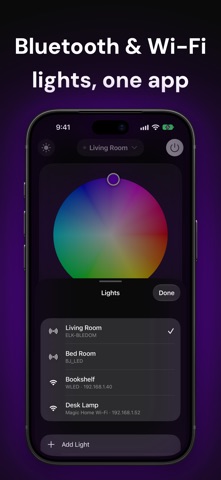
ONE APP FOR MANY STRIPS Glow finds nearby lights automatically and speaks their language. • Bluetooth: controllers that advertise as ELK-BLEDOM, BJ_LED, Triones, LEDnetWF, SP110E, LEDDMX, HiLighting (L7161), iDeal LED and DayBetter, older Govee models, MiPow Playbulb, Moonside and Philips Hue Bluetooth bulbs • Wi-Fi: WLED, Magic Home, WiZ, LIFX, Nanoleaf, Twinkly, Elgato, Shelly, Tasmota, ESPHome and Hyperion, Govee and Yeelight lights with LAN Control, TP-Link Kasa (original local protocol) and Tuya / Smart Life lights with a local key • Hubs: Philips Hue Bridge, IKEA Dirigera and Home Assistant • Apple Home: lights you've set up in the Home app, including Matter lights Strip not recognised? Pick it from the list and try a protocol — you can switch any time.
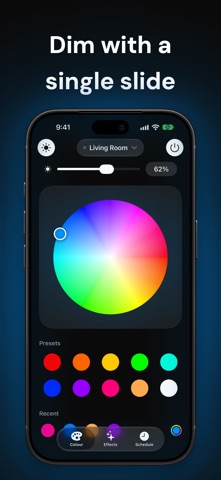
COLOUR, YOUR WAY • A full colour wheel on a glowing surface that lights up in the colour you choose • Ten one-tap presets, including warm and cool white • Recent colours, ready when you want them again • Smooth brightness from a slide-down control
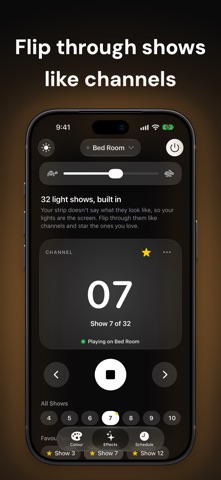
LIGHT SHOWS Play the effects built into your lights. When a strip has named effects, Glow shows animated previews. When it doesn't, Glow turns them into channels: flip through with ‹ and ›, watch your lights change, and star your favourites. Adjust the speed from slow to fast.
SCHEDULES Wake up to light and let it switch off at night. On lights that keep their own clock, Glow saves the schedule onto the light itself, so it runs even when your phone is away. For other lights, Glow walks you through a one-time Shortcuts automation.
APPLE WATCH A big power button tinted with your light's colour. Turn the Digital Crown to dim. Colours, effects and your other lights are one tap away.
SIRI, SHORTCUTS & CONTROL CENTER "Turn on the lights in Glow." "Set Glow to blue." "Dim Glow." Add a Glow toggle to Control Center or the Lock Screen and choose which light it controls.
CHECK & FIX Something not quite right? Check This Light walks through power, colour, brightness and effects, asking a simple yes-or-no question after each. If red shows up green or the light ignores a command, tap Fix and Glow tries other settings until your light responds correctly.
PLAYS NICELY Most strips accept only one connection at a time. Glow connects when you use it and lets go when you're done, so your Watch, Siri or another phone can use the light too.
PRIVATE BY DESIGN Glow talks to your lights directly over Bluetooth or your home Wi-Fi. It doesn't collect, store or share any of your data.
Glow is an independent app and isn't affiliated with or endorsed by any light manufacturer. Siri, Shortcuts and voice control need your iPhone to be within Bluetooth range of the light, or on the same Wi-Fi network.
People rate it
Sign in to rate this app. Honest is what counts.
No ratings yet. Tried it? Be the first to rate it.