
Legbook: Pilot Logbook
Not claimedA flight logbook for pilots, built around the way you log
By Kiyoaki Segawa · ProductivityWhy we expect it: A careful, detailed description gives pilots clear value, and keeping the logbook on-device adds real appeal.




In short
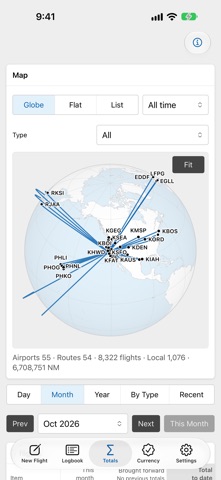
Legbook: Pilot Logbook is a flight logbook for pilots that records flights in UTC or local time and calculates night time from airports and times along the great-circle route. It tracks totals and custom recent experience requirements, with data kept on the device. Its standout feature is the map of routes on a globe and flat map, with counts, time and distance per route and airport.
Summary by Debuts, based on the App Store listing.About
A flight logbook for pilots, built around the way you log. Record flights in UTC or local time, let the app work out night time, and track the currency rules you set. Your logbook stays on your device.
LOGGING • Standard columns: date, aircraft type and registration, from and to, Out / Off / On / In, total, PIC, SIC, dual, instructor, night, actual and simulated instrument, cross-country, simulator, day and night takeoffs and landings, approaches, PIC name, remarks. Hide what you don't use. • Custom fields: time, count, text, choice or yes / no. Time and count fields are totaled; the others can filter totals and currency rules. • Times are stored in UTC and shown and entered in UTC or each airport's local time, daylight saving included. • Total time from Out–In or Off–On, your choice. • Night time and day / night takeoffs and landings are calculated from the airports and times along the great-circle route, with the night definition you pick. Correct any value by hand. • Log by role (PIC, SIC, dual, instructor or a time field of your own) or by crew complement for augmented crews. • Cross-country time is yours to enter: definitions differ between authorities. • Simulator sessions are kept apart from flight time.
TOTALS AND CURRENCY • Totals by month, by year and for the last 30, 90, 180, 365 or any number of days, with previous totals carried forward. • Recent experience requirements you define (takeoffs, landings, approaches, hours or custom fields within a number of days), optionally by aircraft type, tag or custom field value. • Expiry dates on the same screen.
MAP • Your routes on a globe and a flat map, with counts, time and distance per route and airport.
APPLE WATCH AND WIDGETS • An Apple Watch app for totals, currency, recent flights and the route map, and watch-face complications. • Home Screen widgets: Currency, Last Flight, Globe and Map.
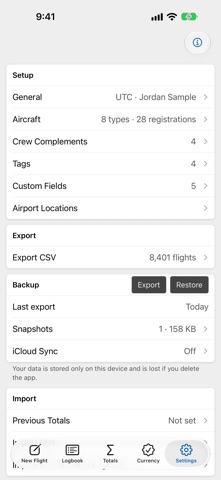
YOUR DATA • Import CSV and XLSX (.xlsx) files from other logbook apps or spreadsheets: check and adjust the suggested column mapping before importing. • CSV export, full backups to a file and automatic snapshots on the device. • In English and Japanese.
PRO (ANNUAL SUBSCRIPTION) The free version keeps up to 50 flights. Pro adds: • Unlimited flights • iCloud sync (iPhone and iPad with the same Apple Account) • Widgets • Apple Watch (the app and the watch-face complications) • Totals by type, category and class • All-time map (free: the last month) • Expiry notifications (on the device) New subscribers can try Pro free for 7 days. Without Pro, at the limit or after a subscription ends, you can still view, export and back up all your flights; you just can't add new ones.
Pro is an auto-renewable yearly subscription at the price shown in the app before you buy. Payment is charged to your Apple Account when you confirm the purchase. It renews automatically unless canceled at least 24 hours before the end of the current period; the renewal is charged within the 24 hours before the period ends. Manage or cancel it in your Apple Account settings. Any unused part of a free trial is forfeited when you buy a subscription. Terms of Use: https://www.apple.com/legal/internet-services/itunes/dev/stdeula/ Privacy Policy: https://kiyonda69.github.io/legbook/privacy/
PRIVACY No account, no ads, no analytics. Your flights are stored on your device and never sent to the developer. With iCloud sync on, they are also stored in your own iCloud. The Apple Watch app gets its data directly from your iPhone.
PLEASE NOTE An unofficial app made independently, not affiliated with, approved or endorsed by any civil aviation authority. You are responsible for checking that your records, totals and exports meet your authority's requirements, including whether they can serve as a legal logbook.
Apple, Apple Watch, iCloud, iPad, iPhone and App Store are trademarks of Apple Inc., registered in the U.S. and other countries and regions.
People rate it
Sign in to rate this app. Honest is what counts.
No ratings yet. Tried it? Be the first to rate it.
More Productivity apps
Best new Productivity apps this week ChickMark: Habit TrackerChickMark is a simple habit tracker for routines, goals, and reminders
 Dayflint: One Thing a DayToo many priorities?
 Fristo CAFMFristo is the app for Fristo CAFM, the facility management software
- BeginAnywayMorning alarm for hard tasks: set one task, prove you started, build a streak
 DHUDEDHUDE Analityxs es la herramienta de gestión diaria para grupos de restauración y ocio…
 ScrollTime: Limit & ChallengesTikTok, Instagram, Facebook… ScrollTime helps you take back control of the time you…