
LetsVoice: AI Voice Notes
Not claimedMost voice notes are a recording you never listen to again
By Akash Sahay · ProductivityWhy we expect it: A clear, relatable problem, a well-structured description with concrete features, and ten screenshots make this a promising productivity app with a strong value story.




About
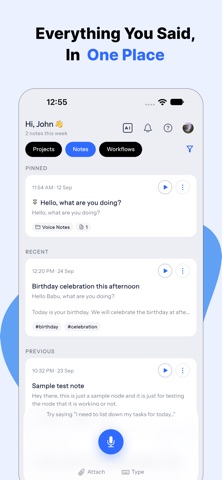
Most voice notes are a recording you never listen to again. LetsVoice turns what you said into something that has already happened by the time you look at it.
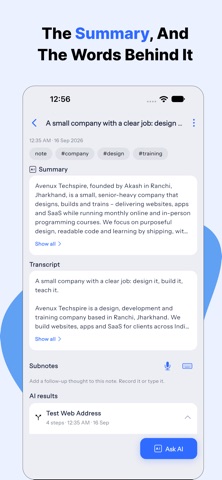
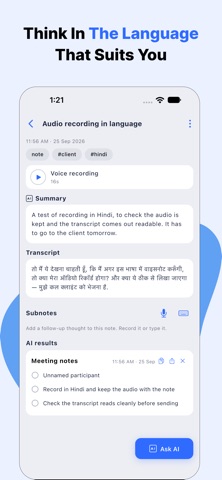
Hold the button and talk. LetsVoice transcribes it, titles it, summarises it, and works out what kind of thing you just said. A task becomes a to-do. A time becomes a reminder that actually goes off. A thought stays a note, filed where you will find it.
CAPTURE HOWEVER SUITS YOU Record a voice note with a tap, type one instead, or photograph a whiteboard, a page or a receipt and let it become a note. Recordings queue up and upload later, so a train tunnel loses nothing.
REMINDERS THAT REACH YOU Set a reminder by saying it. Choose silent, a sound, or one that rings through a Focus for the things you cannot miss. Give each project its own sound, so the client you cannot afford to miss rings through while the rest stay quiet. Reminders can sync to your calendar alongside the rest of your day.
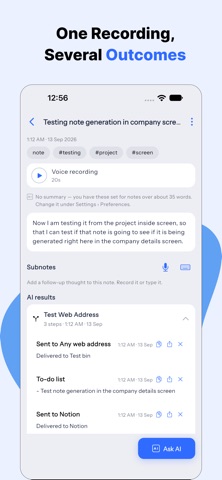
TURN A NOTE INTO WORK Run an action on any note: meeting notes, a to-do list, a summary, a draft email, a draft message, a follow-up. Or write your own instructions and have the app follow them every time.
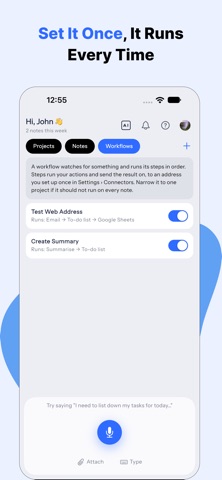
SEND IT WHERE THE WORK LIVES Build a workflow once and a note goes where it belongs: Slack, Microsoft Teams, Discord, Google Chat, Google Sheets, Trello, Notion, HubSpot, an email address, or your own webhook. Run it on every note, only when a word is mentioned, or only when you ask.
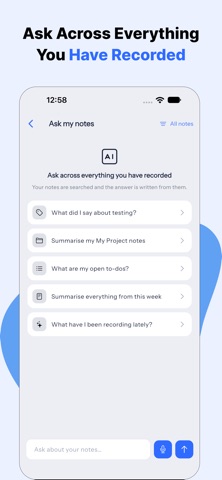
ASK YOUR OWN NOTES Ask a question about a single note, or across whole folders of them, and get an answer drawn from what you actually said.
FIND ANYTHING AGAIN Organize notes into projects. Narrow the feed by words, projects and dates, or just say what you are looking for out loud. Teach it the names and jargon you use so they come out spelled right.
BUILT TO BE TRUSTED Words appear on screen as you speak, recognized on the device itself. Your account and everything in it can be deleted from inside the app, for good, whenever you want.
Some features are part of a paid plan.
Terms of Use: https://www.letsvoice.biz/legal/terms-of-service Privacy Policy: https://www.letsvoice.biz/legal/privacy-policy
People rate it
Sign in to rate this app. Honest is what counts.
No ratings yet. Tried it? Be the first to rate it.