
LIFE/CTRL: Reminders & Tasks
Not claimedMost days follow a familiar flow
By YUKIYA SHIMODA · ProductivityWhy we expect it: A thoughtful routine-as-pattern concept with widgets, free pricing, and clear value for habit-minded planners.


About
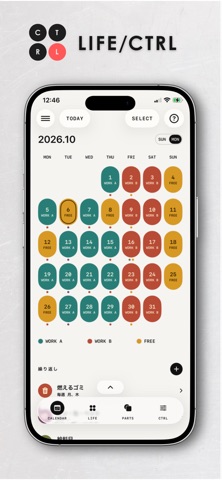
Most days follow a familiar flow. In LIFE/CTRL you build that flow first as a pattern, a LIFE, then add each day's plans on top of it.
Make as many LIFEs as you like: weekdays, days off, days out and more. Put a LIFE on a calendar date and it becomes that day's plan. Add plans or changes for just that day, and the pattern stays as it is.
Inside a LIFE, the day is divided into blocks by time and task, and you add parts, your actions, to each block.
Your Home Screen widget keeps showing the tasks you need right now.
《How it works》
■ Create with CTRL Answer a few questions and CTRL builds a day from wake-up to sleep. You can also type a request to adjust an existing LIFE, create a part, or add TODO items and alarms.
■ Build reusable parts Turn brushing your teeth, meals, work, shopping and other activities into timed parts. Choose an icon and colour, then reuse each part across multiple LIFE templates.
■ Arrange your day Place parts inside blocks such as WAKE, WORK, HOME and SLEEP. Since wake-up starts the day and sleep ends it, schedules that cross midnight, including night shifts, work naturally.
■ Assign LIFE templates to dates Assign a LIFE to a calendar date to create that day. Keep settings that apply every time separate from changes for one specific date.
■ Run the day from widgets Home Screen and Lock Screen widgets show the current block and its parts. Mark actions complete without opening the app.
■ TODO items and alarms Store belongings or steps inside a part as TODO items. Alarms support sound, snooze and vibration-only options.
Available in Japanese, English, Simplified Chinese, Korean and Spanish. Free, with no ads or in-app purchases. Your routine data is stored on your device. Only if you allow CTRL's input interpretation is the text you type sent through our server to Google Gemini.
People rate it
Sign in to rate this app. Honest is what counts.
No ratings yet. Tried it? Be the first to rate it.