
Liquid Record: Audio Recorder
Not claimedYour recording console
By Hilthart Pedersen · Music and audioWhy we expect it: The clear free tier and one-time purchase terms make the app's value easy to understand.


In short
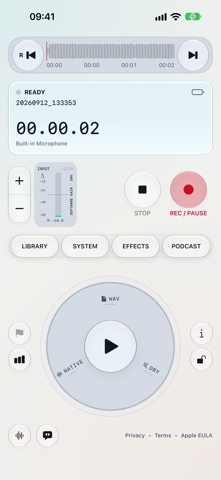
Liquid Record is an audio recording app for iPhone and iPad that captures interviews, voice notes, field recordings, and podcast episodes, then organizes and reviews them in one place. It offers one free recording, with a one-time purchase unlocking more recordings, trim and fades, markers, podcast chapters, and on-device transcription. Its standout feature is headphone monitoring that adjusts filtering and tone while the original recording stays unchanged.
Summary by Debuts, based on the App Store listing.About
Your recording console. Wherever inspiration strikes.
Liquid Record brings a tactile recording workspace to iPhone and iPad. Capture interviews, voice notes, field recordings, and podcast episodes, then organize and review your audio in one place.
ONE RECORDING FREE Make one microphone recording, pause and resume the same take, and play it back. Basic input gain, audio route controls, appearance settings, and privacy information remain available without a purchase. Deleting the recording does not reset the free allowance.
FULL ACCESS — ONE PURCHASE A one-time non-consumable in-app purchase unlocks additional recordings and production tools: audio import and export through Apple Files, project naming and duplication, markers and time-coded notes, trim and fades, edited WAV exports, headphone monitoring effects, podcast organization, chapters, transcription, and optional AI summaries. There is no subscription or recurring charge. The localized price is displayed in the app and Apple's purchase confirmation. Restore Purchase restores an eligible purchase using the same Apple Account.
RECORD WITH CONTROL • Capture audio in PCM WAV. • Choose device-native, 44.1 kHz, or 48 kHz recording formats. • Select mono or stereo recording. • Pause and resume the same recording. • Adjust input gain and watch live levels, peak indicators, and clipping warnings. • Select available microphone inputs, including compatible USB microphones.
LISTEN AND REFINE • Play recordings and scrub through the waveform. • Add markers and timed notes to find important moments. • Monitor through compatible headphones. • Shape headphone monitoring with low-cut filtering, tone controls, and ambience while keeping the original recording dry.
KEEP YOUR WORK ORGANIZED • Rename, duplicate, and manage recordings. • Import audio through Apple Files. • Export and share recordings. • Plan and review episodes in the podcast overview.
TURN SPEECH INTO TEXT • Transcribe recordings on device using Apple speech technology. • Generate summaries on supported devices with Apple Intelligence. • Transcription and summaries depend on device capabilities, language support, and model availability.
DESIGNED FOR YOUR WORKFLOW • Portrait and landscape console layouts. • Light, dark, and system appearance options. • Native Liquid Glass controls on supported system versions. • Direct access to audio, recording, and project settings.
TRANSCRIBE ON DEVICE Transcription uses Apple's on-device speech technologies and depends on supported device languages and available speech models. Models may need a download before use. Optional AI summaries require iOS/iPadOS 26 or later, an eligible device with Apple Intelligence enabled, and a ready model. Speech recognition and generated summaries may contain errors; review them before publishing.
PODCAST WORKSPACE Organize episode notes and project details, import public episode metadata from a podcast RSS feed, and link Spotify show and episode pages. To publish to Spotify for Creators, export a WAV and upload it on the Spotify for Creators website. Liquid Record does not automatically upload episodes or ask for your Spotify password.
PRIVATE APP STORAGE Recordings, transcripts, and project information are processed in the app on your device. Liquid Record does not upload them to an H3P server. Sharing occurs through destinations you select; device backups follow your Apple settings. Optional RSS requests contact the selected feed provider. No H3P account is required.
People rate it
Sign in to rate this app. Honest is what counts.
No ratings yet. Tried it? Be the first to rate it.
More Music and audio apps
Best new Music and audio apps this week KlingKlang – Control de AudioKlingKlang reúne todas las salas de tu sistema Sonos en una sola pantalla
 CalabiCalabi is a music toy you can see
 Fingertip Player: Feel MusicClose your eyes
 BANANA-1One banana
 Acord: Guitar Tuner, MetronomeAcord is a precise tuner and metronome for every musician
 MonandaegMōnandæg is two field recorders that cannot leave anything alone