
LISA Explorer
Not claimedLISA Explorer is a fast dual-pane file manager for your Mac and your servers
By Adrian Dinu · Utilities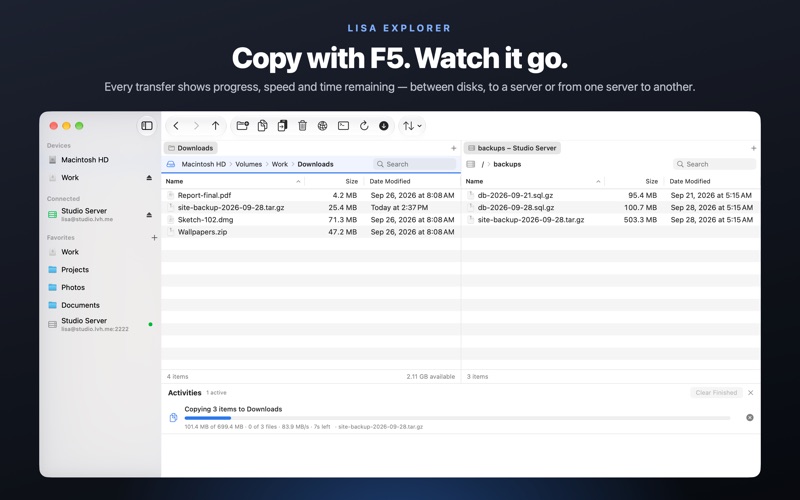



About
LISA Explorer is a fast dual-pane file manager for your Mac and your servers. Two folder panes side by side, tabs in each, a sidebar with your disks, favorites and saved SFTP servers, and the classic commander function keys: F5 copies to the other pane, F6 moves, F7 makes a folder, F8 deletes.
TWO PANES, MANY TABS • Browse two folders at once and copy or move between them with one key • Tabs in each pane: drag a tab to the other pane or reorder it • Clickable path bar, type a path (⌘L), go to folder (⇧⌘G), filter the list (⌘F) • Fast listings with sortable columns: name, size, dates, kind, permissions • Hidden files on or off, folders first, type to select
YOUR SERVERS, RIGHT THERE • SFTP and SCP over SSH with password or private-key authentication • Passwords and passphrases are kept in your macOS Keychain • Host keys are remembered on first connection and checked afterwards • Copy between two servers, browse, rename, delete, create folders • Quick Look and open or edit remote files, downloaded on demand • Remote folders refresh themselves while you work; dropped connections come back on their own
TRANSFERS YOU CAN SEE • Copy, move and delete between any two locations: disk to disk, disk to server, server to server • Progress, speed and time remaining for every job, with cancel • Conflicts are yours to decide: Replace, Skip or Keep Both, once or for all • Local copies use APFS cloning when possible; local deletes go to the Trash
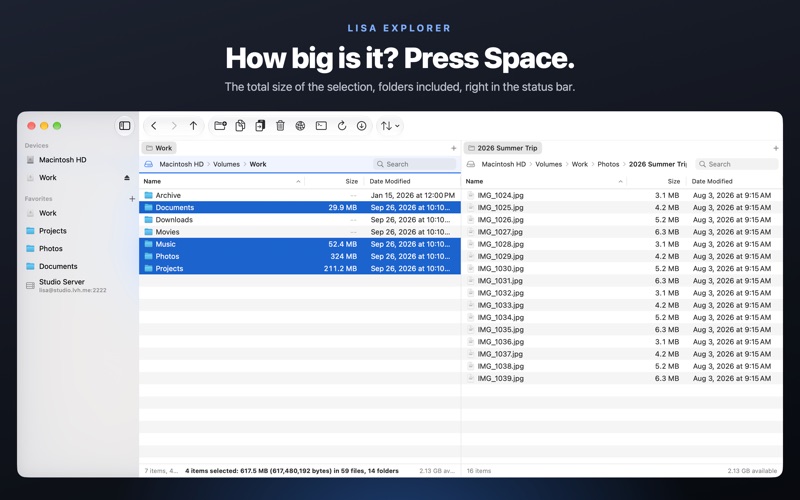
THE LITTLE THINGS • Press Space to see the total size of the selection, including everything inside folders, in bold in the status bar • Hold Space for Quick Look • Rename in place (F2 or click the name), new text file (⇧F4), new folder (F7) • Drag and drop to and from the Finder, ⌘C/⌘V of files, Get Info, Reveal in Finder, Copy Path • Open a Terminal window at the current folder, on your Mac or on the server • Import your favorites and servers from other file managers
PRIVATE BY DESIGN • No account, no sign-up, no analytics, no ads • Your files and credentials never leave your Mac except to the servers you connect to • Free, with every feature included
Mac App Store apps run in a sandbox, so on first launch LISA Explorer asks you once to choose the disk or folders it may manage. You stay in control: revoke access at any time in System Settings.
People rate it
Sign in to rate this app. Honest is what counts.
No ratings yet. Tried it? Be the first to rate it.