
Loungemote - TV Remote Control
Not claimedLost the TV remote again?
By Su Bo · UtilitiesWhy we expect it: Clear value and a thorough listing covering many TV brands, with a free trial and simple setup steps.





About
Lost the TV remote again? Loungemote turns your iPhone or iPad into a Wi-Fi remote for Samsung, LG, Roku, Fire TV, Google TV, Vizio, Sony and more. No infrared blaster, no extra hardware, no account. New subscribers can try every feature free for 3 days.
SET UP IN THREE STEPS 1. Connect your iPhone and your TV to the same Wi-Fi network. 2. Open Loungemote. It finds TVs on your network automatically. 3. Accept the prompt or enter the code shown on your TV. Done. Setup and your first key press are free, so you can check that your TV responds. No TV nearby? Try Demo TV first.
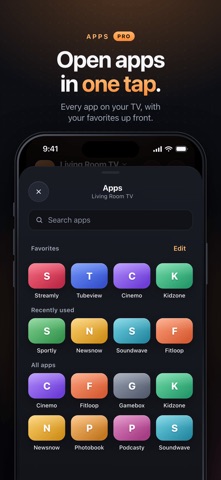
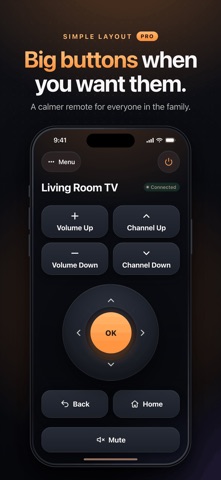
LOUNGEMOTE PRO • D-pad, OK, Back and Home • Volume, mute, channel and playback keys • Apple TV: see what's playing with its artwork, then play, pause, skip or seek • Power and input switching on supported TVs • Simple layout with extra-large buttons • Phone keyboard: type searches and sign-ins with your iPhone keyboard • Apps in one tap: open your streaming apps on the TV from your phone • Swipe touchpad for fast, one-handed navigation • Every TV at home: save multiple TVs and switch in a tap • Casting: send videos, photo slideshows, files and supported links to your TV, Chromecast or Roku • Siri and Shortcuts: turn the TV on or off, mute, change the volume or open an app by voice Features and casting formats depend on your TV model and software.
WORKS WITH Samsung Smart TV (Tizen), LG Smart TV (webOS), Roku and Roku TV, Google TV (including earlier models), Amazon Fire TV and Fire TV Stick, Vizio SmartCast, Sony Bravia, Xiaomi PatchWall, Hisense VIDAA, Philips Titan OS and Saphi, and Apple TV HD and Apple TV 4K. Roku TV and Google TV models from other brands, such as TCL, work too. Compatibility varies by model. Casting is not supported on Fire TV; on Apple TV, use AirPlay for photos and videos. Infrared-only TVs are not supported.
COMMON QUESTIONS Do I need an IR blaster? No. Loungemote controls smart TVs over your home Wi-Fi. Why can't it find my TV? Check that the TV is on and on the same Wi-Fi network as your iPhone, and that Local Network access is on for Loungemote in iOS Settings. Is it free? Setup and Demo TV are free, with no ads. Controlling your TV needs Loungemote Pro, which new subscribers can try free for 3 days.
PRIVACY No account and no ads. Remote commands stay on your local network. The app uses Google Analytics for Firebase and Firebase Crashlytics to understand app usage, purchases and crashes. You can turn off Share Usage Data in Settings > Privacy. When you use Google Cast, Google's Cast SDK may send diagnostics, usage data, a device identifier and coarse location to Google. See the Privacy Policy for details.
PURCHASES Loungemote Pro is available as an auto-renewable weekly subscription with a 3-day free trial for eligible new subscribers, an auto-renewable yearly subscription, or a one-time lifetime purchase. The app shows the local price, period and any eligible trial before you buy. If you don't cancel at least 24 hours before the trial ends, the paid weekly subscription starts. Subscriptions renew automatically unless canceled at least 24 hours before the current period ends. Manage or cancel subscriptions in your Apple Account settings. Use Restore to restore eligible purchases.
Loungemote is an independent app. It is not affiliated with or endorsed by the TV manufacturers listed above. All trademarks belong to their respective owners.
Terms of Use: https://loungemote.github.io/loungemote-site/terms/ Privacy Policy: https://loungemote.github.io/loungemote-site/privacy/ Apple Standard EULA: https://www.apple.com/legal/internet-services/itunes/dev/stdeula/
People rate it
Sign in to rate this app. Honest is what counts.
No ratings yet. Tried it? Be the first to rate it.