
Lumax Tempo
Not claimedFind your daily rhythm
By 学龙 于 · ProductivityWhy we expect it: Clear menu bar concept, a thorough description, transparent free limits and eight screenshots make it promising.


About
Find your daily rhythm.
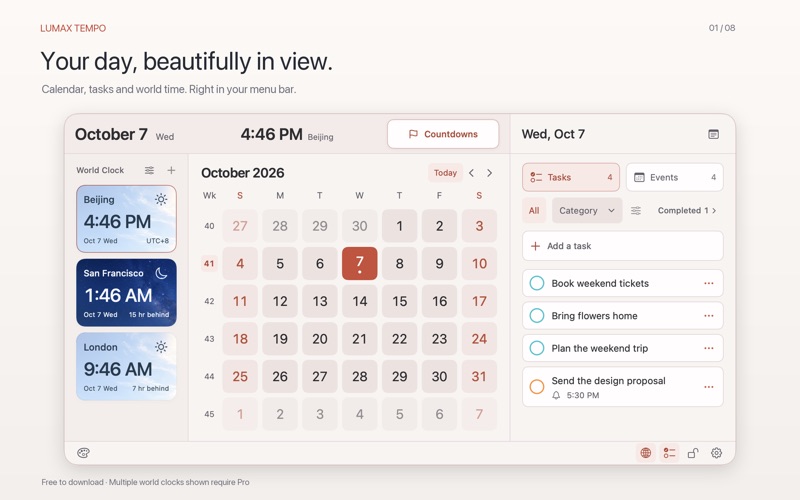
Lumax Tempo brings your calendar, tasks, world clocks, countdowns and desktop notes together in the menu bar. Open it to see today at a glance and make room for what comes next.
CALENDAR & EVENTS • Browse a monthly calendar with optional Chinese lunar dates, traditional festivals and solar terms. • Connect macOS Calendar with your permission to view, create, edit and delete events. Event editing is included for free. • Optionally display the 2026 public holiday and adjusted workday schedule for mainland China. This is not a worldwide public holiday calendar.
TASKS & REMINDERS • Connect macOS Reminders with your permission to view, complete and organize tasks. • Rename, reorder and show or hide categories for free. • Create up to 5 tasks through Tempo each local day on this Mac for free. Only successful creations count; edits, external syncing and system-generated recurring tasks do not. Completing or deleting a task does not restore that day’s allowance.
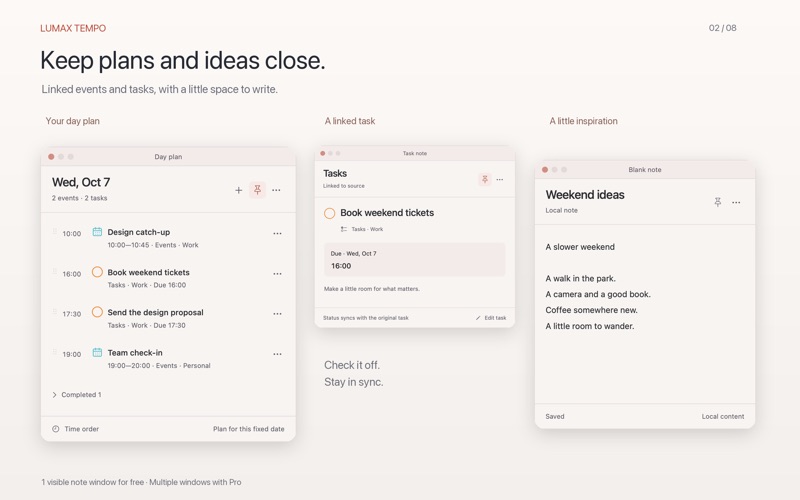
WORLD TIME & IMPORTANT DATES • Check local times with day and night city cards. Backgrounds reflect local time, not live weather. • Save a custom countdown and keep track of upcoming festivals. • Keep plans and tasks visible in desktop notes. • The free edition includes 1 world clock city, 1 saved custom countdown and 1 visible desktop note window at a time. Saved notes are not limited by this window allowance.
OPTIONAL TEMPO PRO · ONE-TIME PURCHASE • Create tasks without a daily limit and configure recurring reminders. • Change category and task colors, choose an accent color or enter a custom HEX color. • Use a transparent glass background and customize menu bar layouts, seconds, time format and reference city. • Add more world clock cities and preview other times, save multiple custom countdowns and show multiple desktop notes at once.
The free edition uses the Coral accent, a solid background and the default date-and-time menu bar display. Light, dark and system appearance modes are all free. Pro is an optional non-consumable in-app purchase, not a subscription. The App Store displays the price before purchase. Restore an eligible purchase using the same Apple Account. Tempo Pro and Lumax Clip Pro are separate purchases.
LOCAL FIRST No Lumax account, ads or third-party analytics. Notes, preferences and countdowns stay on your Mac. Calendar and reminder syncing is handled by your configured system accounts or providers. Feedback is sent only after you review and send it in your mail app.
Requires macOS 14 or later. Available in English and Simplified Chinese. Calendar and Reminders access requires permission. System accessibility settings may affect the glass appearance.
Support: https://lumaxspace.com/support/ Privacy: https://lumaxspace.com/privacy/ Terms: https://lumaxspace.com/terms/
People rate it
Sign in to rate this app. Honest is what counts.
No ratings yet. Tried it? Be the first to rate it.