
Luttie: Log & LUT Color Studio
Not claimedLuttie is a Look Development Studio for iPhone and iPad
By Lintao Li · Photo and videoWhy we expect it: Clear, well-argued value for log footage creators, with thoughtful camera-aware design, an open LUT workflow and five screenshots.


About
Luttie is a Look Development Studio for iPhone and iPad. Turn log footage and everyday photos and videos into Looks you can reuse on every clip — without first becoming a colorist.
LOOKS, NOT A PANEL OF SLIDERS Start from a result. Eight built-in Looks — Natural, Warm, Cool, Contrast, Vivid, Soft Film, Muted and B&W — are maintained as parametric recipes. Pick one, fine-tune it, and save it as your own. Press and hold the picture at any time to compare with the shot as it was.
CAMERA-AWARE BY DESIGN Log footage is flat on purpose. Luttie reads the camera profile from each file, converts it into a wide-gamut working space, and only then applies your Look. The camera conversion and the creative Look stay separate, so one Look works on footage from every camera. • Apple Log and Apple Log 2 are recognized automatically • Also supports HDR (HLG and PQ), Sony S-Log3 (S-Gamut3 and S-Gamut3.Cine), DJI D-Log and Blackmagic Gen 5 • When a file doesn't say how it was recorded, Luttie asks — it never guesses
A LOOK IS MORE THAN A LUT Saved Looks keep the whole recipe: tone curve, color balance, saturation and a per-hue Color Mixer with skin-tone protection. Reopen any Look and keep adjusting it on a new photo or clip.
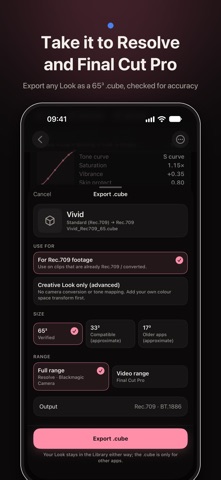
AN OPEN WORKFLOW • Export any Look as a 65³ .cube, checked for accuracy in DaVinci Resolve and Final Cut Pro, and imported into Blackmagic Camera • Choose a .cube for standard video or one that includes the camera conversion for your log footage • Import your own .cube files — Luttie measures what input each LUT expects so it renders correctly, and you can change it at any time
EXPORT PHOTOS AND VIDEO Save finished photos and videos to Photos or Files. Photos and video share the same Metal color pipeline as the preview, so what you see is what you export. Video keeps its audio.
PRIVATE BY DESIGN Everything runs on your device. No account, no uploads, no analytics.
FREE • All built-in Looks and every supported camera profile • 1080p SDR video export with no watermark and no length limit • .cube export and import • Up to 10 of your own Looks
LUTTIE PRO — ONE-TIME PURCHASE, NO SUBSCRIPTION • Original-resolution, 10-bit SDR video export • Batch Export • Fade, Grain and Halation • Contact Sheets • Unlimited Looks Luttie Pro supports Family Sharing.
Requires iOS or iPadOS 18 or later.
Questions or feedback: contact@ipixel.to Privacy Policy: https://luttie.ipixel.to/privacy
People rate it
Sign in to rate this app. Honest is what counts.
No ratings yet. Tried it? Be the first to rate it.