
MapBridge Pro
Not claimedMapBridge Pro helps map links work with the maps app you choose
By Brent Gaddis · Travel
About
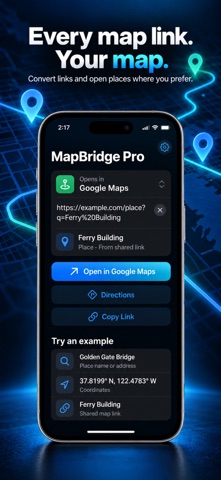
MapBridge Pro helps map links work with the maps app you choose. Pick Apple Maps, Google Maps, or Waze, then paste a link, address, place name, coordinates, or full Plus Code. Review the place or route, then open it, get directions, or copy a converted link.
WORKS WHERE LINKS FIND YOU • In the app: paste or type a location, then choose Open, Directions, or Copy Link. • Share Sheet: send a map link or dropped pin from Messages or another app to MapBridge Pro, then copy the converted link. • Safari: enable the extension and grant site access to switch supported map pages after a short countdown. You can stay on the page instead. • Siri and Shortcuts: use built-in actions to open a location, convert a link, or change your chosen maps app.
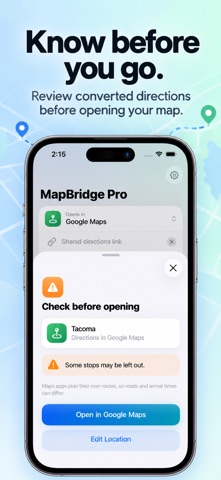
REVIEW BEFORE YOU GO MapBridge Pro shows what it found before opening a link. If a route detail cannot carry over to another maps app, it asks you to review the change. Save recent locations on your device for quick access, or turn the list off.
YOUR MAPS, YOUR CHOICE Change your preferred maps app in Settings or choose another for a single link. MapBridge Pro does not change your iPhone or iPad’s system default maps app. If your chosen app is not installed, the converted web link can open instead.
No account or location permission is required. Short links need an internet connection to expand. Maps apps may calculate different routes and arrival times.
People rate it
Sign in to rate this app. Honest is what counts.
No ratings yet. Tried it? Be the first to rate it.