
MarketClock – Trading Hours
Not claimedMarketClock keeps the futures trading day in your menu bar
By Shamshad Zaheer · FinanceWhy we expect it: Clear value for futures traders, with a focused menu bar design and thoughtful handling of time zones and holidays.


In short
MarketClock, Trading Hours is a menu bar app that shows the live futures trading session, its time remaining, the next session's start, and whether CME Globex is open, halted, or closed. It is aimed at traders of CME futures such as Micro Nasdaq and gold. It stands out for working offline with built-in CME holiday closures and early halts, and for keeping all settings on the Mac with no account or network access.
Summary by Debuts, based on the App Store listing.About
MarketClock keeps the futures trading day in your menu bar. See the session in progress, how long it has left, when the next one starts, and whether CME Globex is open, halted, or closed, without doing time zone math.
Built for traders of CME futures such as Micro Nasdaq (MNQ) and gold.
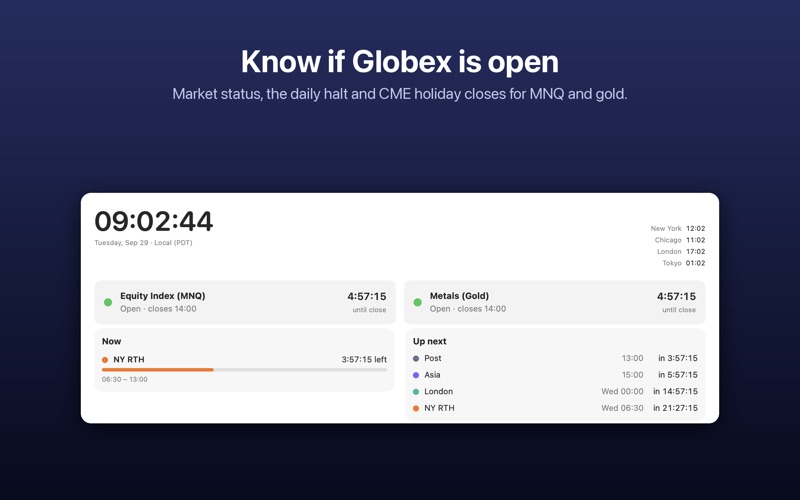
AT A GLANCE • The live session (Asia, London, NY RTH, Post) and a countdown to its end • When the next session opens • Globex status: open, in the daily halt, closed for the weekend, or closed or closing early for a CME holiday • Local time plus New York, Chicago, London and Tokyo
DASHBOARD • The whole trading day on a 24-hour timeline, with a live "now" marker • Status for equity index (MNQ) and metals (gold) markets side by side • "Now" and "Up next" panels with exact times and countdowns
SESSIONS YOUR WAY • Futures split preset on by default • Switch on Classic 4 sessions (Sydney, Tokyo, London, New York), ICT killzones, or gold key times (COMEX session, settlement, LBMA fixes) • Edit any session or add your own in any time zone • Each session is kept in its home time zone, so it stays correct when the US and UK change clocks on different dates
ALERTS AND WIDGET • Optional notifications at the open, a few minutes before, or at the close of any session • Desktop widget with the current session and market status • Launch at login
CME HOLIDAY CALENDAR Holiday closures and early halts for equity and metals futures are built in and work offline. The app warns you when its holiday data needs an update.
PRIVATE No account, no tracking, no ads, and no network access. Your settings stay on your Mac.
MarketClock shows exchange session times for convenience only and is not financial advice. Always confirm trading hours with CME Group, especially around holidays.
People rate it
Sign in to rate this app. Honest is what counts.
No ratings yet. Tried it? Be the first to rate it.
More Finance apps
Best new Finance apps this week NjukiYour rent should do more than pay for where you live
 Inflation WatchInflation Watch turns official price data into plain English
 uOwe: Split Bills & BudgetuOwe keeps shared costs fair and your own money clear
 Debtless: Debt-Free by WhenYou are about to know when you will be free
 Pace: Daily Budget & SpendPace turns your monthly budget into one calm number: what you can spend today
 Spending ReviewSpending Review is the grocery total you keep with one hand, with the trolley in the…