
Mask Note: Image Occlusion
Not claimedMask Note turns any photo into a self-quiz
By HyunChol Jo · Education


In short
Mask Note: Image Occlusion turns photos of textbook pages, handwritten notes, diagrams, maps, or sheet music into self-quizzes by covering parts with masks that you tap to reveal. It suits students preparing for school, college, licensing, or certification exams, and medical or nursing students learning from anatomy figures. Study data stays on the device by default, with optional Google Drive backup.
Summary by Debuts, based on the App Store listing.About
Mask Note turns any photo into a self-quiz. Cover the parts you need to memorize on a textbook page, your handwritten notes, an anatomy diagram, a map, or sheet music, then tap each mask to reveal the answer. It is image occlusion made simple: snap, mask, reveal, remember.
■ Mask right on the photo · Take a photo or pick one from your photo library, then cover what you want to learn · Use rectangles or freeform polygon masks to match any shape · Label each mask so you know what you are recalling · Zoom and pan to cover small text precisely, and move or resize masks anytime · Find text in the photo and tap a word or a line to mask it, processed on your device (Korean and English text) · Pick several photos at once and turn them into notes in one folder (up to 20) · Edit notes whenever you like: add, delete, relabel, with undo and redo
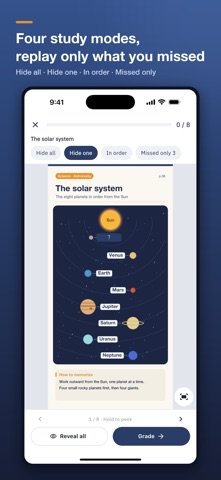
■ Tap to reveal and test yourself · Sample notes are ready the first time you open the app · Tap masks one by one in study mode to check your answer · Four study modes: hide all, hide one, in order, and missed ones only · Press and hold to peek, and mark what you missed to review just those next time · Diagrams, labeled figures, maps, charts, and scores that are hard to turn into text flashcards stay as images
■ Review before you forget (spaced repetition, SM-2) · Today's review picks the notes that are due and adjusts the next date by how hard each one felt · Get a reminder on days when you have notes to review · Set an exam date, folder, and daily goal to see what to study today · Go over every note once more right before the exam
■ Folders and optional backup · Organize notes by subject or exam · Back up to your own Google Drive and share by link if you want · Send a note to a friend as a file, and open notes you receive without signing in
■ Study stays on your device by default · No sign-up. Photos and notes are processed and stored on your device by default · Photo editing, text recognition, and study work offline · Drive backup, if you choose it, sends photos and note data to your own Google cloud, and sharing goes through the app you pick · Drive backups remain after you uninstall the app and can be deleted in Drive · Ads, analytics, and text recognition SDKs may process identifiers and usage and diagnostic data
Great for · Students with a lot to memorize for school, college entrance, licensing, or certification exams · Medical, nursing, and health science students learning anatomy from figures · Anyone memorizing maps, charts, vocabulary pages, or music
Stop just rereading. Cover it, reveal it, and make it stick. Free with ads.
People rate it
Sign in to rate this app. Honest is what counts.
No ratings yet. Tried it? Be the first to rate it.
More Education apps
Best new Education apps this week FluencyToolShadow a native Japanese sentence, hear your own voice back, and get scored.
 YoMoo: Read & Shadow JapaneseYoMoo turns real Japanese writing into graded reading practice: news articles, Wikipedia…
 KeyswingLearn music notes, rhythm and piano through playful practice in a magical forest.
 Uncle Math Homeschool - 6 to 8No Math Fear, Uncle Math Is Here
 Malachi SpeaksMalachi Speaks gives a voice to people who don't use speech
 SelvarisWatch evolution unfold in real time – on an entire planet