
MCDU Trainer
Not claimedPractice A320 MCDU and Boeing 737-800 NG CDU operations on iPhone and iPad, and explore…
By Yunqihangke (chengdu) Technology Co., Ltd · EducationWhy we expect it: A thoughtful, well-documented practice tool that makes MCDU and CDU procedures accessible to aviation learners on iPhone and iPad.



About
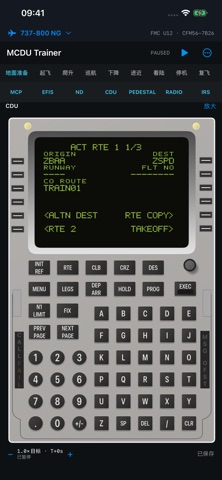
Practice A320 MCDU and Boeing 737-800 NG CDU operations on iPhone and iPad, and explore how flight plans, controls and instrument indications work together.
Choose an aircraft and follow a continuous practice flight from ground preparation through takeoff, climb, cruise, descent, approach and landing. Each aircraft keeps its own flight plan and practice state. Switch aircraft and return to your previous session. Run, pause, flight-phase positioning and saved scenarios help you revisit an operation and inspect its result.
• Focus on MCDU/CDU entry, editing and error recovery, including initialization, route and performance operations. • Use the MCDU/CDU, ND, EFIS and FCU/MCP within the same flight and observe changes in guidance and indications. • View the complete instrument workspace on iPad, or scroll and jump between instruments on iPhone. • Practice with local training data, waypoints and scenarios without creating an account.
The A320 and 737 have separate state and logic. The 737 training configuration targets the 737-800 NG with a conventional CDU, the FMC U12 family and SFP/26K reference scope. It does not represent the 737 MAX or guarantee the configuration of a particular airline or individual aircraft.
Navigation data consists of fixed training snapshots. Coverage and data dates are identified in the app and source documentation; this is not a current operational navigation database. Performance, motion and system responses include nominal training models and simplifications. Communications are local training functions and do not connect to an airline, air traffic control or a live ACARS network.
This independently developed practice tool is not an official Airbus, Boeing or Honeywell product or a certified flight training device. Do not use it for real flight navigation, performance calculations or operational decisions. Practice state is stored on the device; automatic cross-device synchronization is not provided.
People rate it
Sign in to rate this app. Honest is what counts.
No ratings yet. Tried it? Be the first to rate it.
More Education apps
Best new Education apps this week FluencyToolShadow a native Japanese sentence, hear your own voice back, and get scored.
 YoMoo: Read & Shadow JapaneseYoMoo turns real Japanese writing into graded reading practice: news articles, Wikipedia…
 KeyswingLearn music notes, rhythm and piano through playful practice in a magical forest.
 Uncle Math Homeschool - 6 to 8No Math Fear, Uncle Math Is Here
 Malachi SpeaksMalachi Speaks gives a voice to people who don't use speech
 SelvarisWatch evolution unfold in real time – on an entire planet