
MileMate Garage
Not claimedYour cars
By Mikolaj Mrowiec · ProductivityWhy we expect it: The careful, honest description and clear value make this a promising tool for organised car owners.


About
Your cars. Their history. One organised garage.
MileMate Garage helps you keep a personal vehicle maintenance history, from routine oil changes to major repairs. Available on iPhone, iPad and Mac.
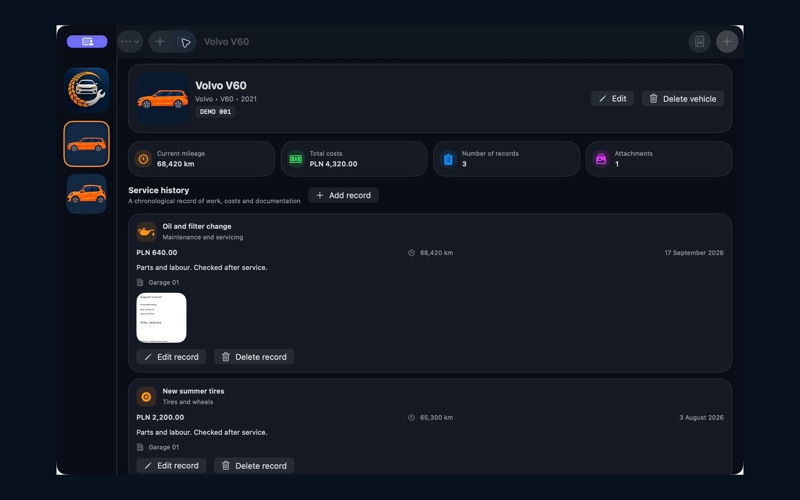
KEEP YOUR SERVICE HISTORY ORGANISED Record the date, mileage in kilometres, cost, work performed, workshop and notes. The vehicle card shows the highest mileage entered for the vehicle or its service records. See total costs, record counts and attachment counts at a glance. Edit your vehicles and service entries. Deletion requires confirmation; deleting a vehicle removes its associated records and photos.
KEEP PHOTOS WITH THE RIGHT RECORD Attach photos of invoices, parts and work in progress from Photos or Files. On iPhone and iPad, you can also take a photo directly in the app. Open attachments and zoom in to inspect them. New photos are optimized to reduce storage use. Originals in Photos and Files remain unchanged.
CREATE A PRINTABLE PDF Export a vehicle’s history as an A4 PDF with dates, mileage, costs and notes. Attached photos appear at the end of the report, one per page, in chronological order, with a caption identifying the service entry. Images are fitted to the paper and optimized for printing. Long notes in the summary may be shortened. Reports reflect user-entered data, not independently verified history or a vehicle condition certificate.
YOUR GARAGE ACROSS YOUR DEVICES iCloud synchronises vehicles, service records and attachments between devices using the same Apple Account. Data downloads automatically, but not always immediately. You can work locally without internet; synchronisation requires iCloud to be available.
TRANSFER A VEHICLE’S HISTORY Export a vehicle or your entire garage as a MileMate backup file and share it using AirDrop or the system share sheet. The recipient reviews a summary and confirms the import. Existing data is recognised to avoid duplicates. Importing a backup does not delete local records. Backups are not password-protected; share them only with trusted recipients.
MAKE IT YOUR GARAGE Dark appearance by default, an optional light appearance and a choice of vehicle icons. On Mac, collapse the garage sidebar to an icon rail.
People rate it
Sign in to rate this app. Honest is what counts.
No ratings yet. Tried it? Be the first to rate it.