
Minata Panel
Not claimedMinata Panel is the iPhone and iPad companion to the Minata Rental Suite back office
By Minata Entertainment, LLC · ProductivityWhy we expect it: The description is clear and careful, with a well-defined purpose for rental staff who work away from the desk.




About
Minata Panel is the iPhone and iPad companion to the Minata Rental Suite back office. It carries the parts of the web panel that are used away from a desk: reservations, payments, the pickup and return sheet, and customer records.
An active Minata Rental Suite account is required. This app is a client for that service, not a standalone product: you sign in with the staff account your company already has, and what you can open follows the permissions on that account. There are no in-app purchases and nothing is sold inside the app.
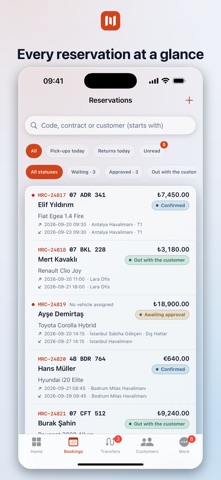
DASHBOARD Today's pickups and returns, pending reservations, unread messages and the latest activity on one screen. Every card opens the list or the record behind it.
RESERVATIONS Search and filter the list, then open a record to see its price breakdown, extras, documents, payments and history. Confirm, reject, cancel or mark a reservation as no-show. Extend the rental, change extras, adjust the price, assign or release a plate, record a contract number or a note for the desk, and resend a customer notification. Create a reservation with a six-step flow: customer, dates and locations, vehicle, extras, price and payment, summary.
PAYMENTS Record what was taken at the desk in cash, by bank transfer or on the card terminal; issue a refund; void a receipt; or send the customer an online payment link. Amounts are shown in the currency of the reservation.
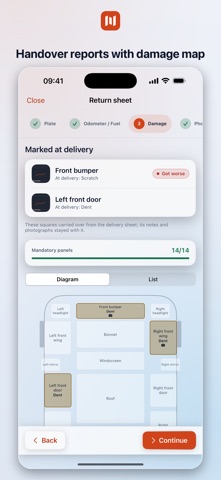
PICKUP AND RETURN Complete the handover sheet where the car is: plate, odometer, fuel level, a twenty-panel damage map, photographs, and the customer's signature drawn on screen. A return shows what was marked at pickup, so a new scratch is visible as a new scratch. Mid-rental vehicle changes produce their own interim sheet, and every finished sheet is available as a PDF.
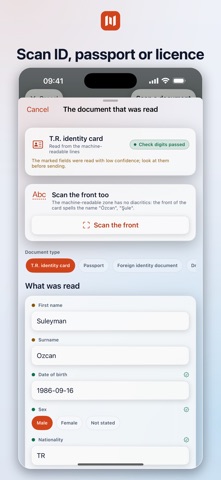
CUSTOMERS Customer list, account statement, rental history, loyalty points and blacklist flag. Scan a Turkish identity card, a passport or a driving licence with the camera. The document is read on the device, the fields land in the form, and you confirm them before anything is saved. If the number already belongs to a customer, the app offers to update that record instead of opening a duplicate. The photograph of the document is only uploaded if you switch that on.
TRANSFERS, MESSAGES AND FLEET REQUESTS Transfer reservations with their own list, status changes and payments. Messages from your website's contact form and long-term fleet rental requests, each with an unread badge.
NOTIFICATIONS A push notification when a new reservation, a transfer, a contact message or a fleet request arrives. Tapping it opens the record, switching company first if the record belongs to another one.
ALSO One person can manage several companies and switch between them without signing in again. Turkish and English. The app follows the device language and can be changed in settings. Separate iPhone and iPad layouts; the iPad layout uses the full screen and supports Split View and Stage Manager. A signed-in session lasts 30 days. The last data loaded stays readable when the connection drops, with a banner saying so.
People rate it
Sign in to rate this app. Honest is what counts.
No ratings yet. Tried it? Be the first to rate it.