
Missed - Notification Keeper
Not claimedNever lose a notification again
By minseo kang · UtilitiesWhy we expect it: Clear value, honest limits, and strong privacy make this a well-judged utility for iPhone users.




About
Never lose a notification again.
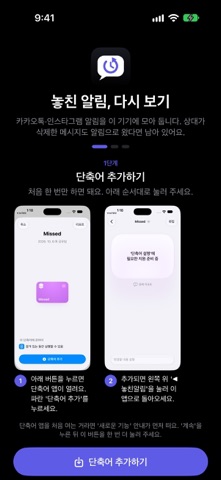
Missed keeps notifications from apps like KakaoTalk and Instagram on your iPhone. If a message arrived as a notification, you can still read it — even if the sender deleted it later.
■ How it works · Saves notifications using the iOS 27 Shortcuts "When I receive a notification" automation · Add the shortcut once and turn on the automation — a short in-app video shows you how · Check Connection tells you right away if everything is set up
■ Easy to read · Filter by app (KakaoTalk, Instagram, Messages) · Organized into conversations by sender or group chat · Search by sender or text, and star the ones you want to keep
■ Private · Everything stays on this iPhone and is never sent anywhere · Face ID lock and hidden app-switcher preview · Auto-delete after 7, 30 or 90 days, or keep forever
Requires iOS 27 and the Shortcuts app. Notifications from before the automation is on can't be recovered, and notifications are saved without text if previews are turned off for that app.
People rate it
Sign in to rate this app. Honest is what counts.
No ratings yet. Tried it? Be the first to rate it.