
Mixbar: Per-App Volume
Not claimedYour Mac has one volume knob
By Kevin Fitzgerald · UtilitiesWhy we expect it: A clear, useful utility that solves a real Mac annoyance, with a thoughtful privacy explanation and practical features.


In short
Mixbar: Per-App Volume gives each app playing sound on a Mac its own volume slider, controlled from the menu bar. It suits people who want a call quieter than a video or music played through different outputs. One standout detail: it can boost a quiet app up to 200% and remembers each app's level for next time.
Summary by Debuts, based on the App Store listing.About
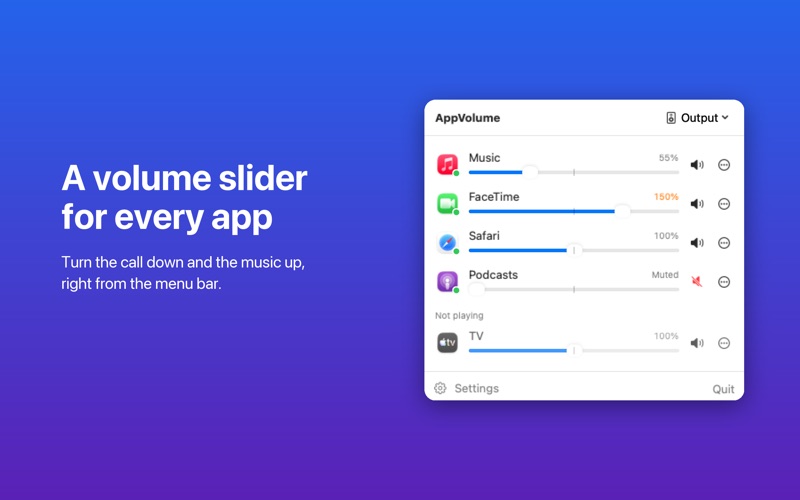
Your Mac has one volume knob. This gives every app its own.
• A slider for each app that's playing sound, right from the menu bar • Boost quiet apps past normal volume (up to 200%) for soft videos and calls • Mute any app with one click • Send an app to a different output: music to your speakers, a call to your headphones • Keyboard shortcuts to turn the app you're using up or down • Remembers each app's volume and brings it back next time • The Mac's own volume sits right alongside • Opens at login if you like
PRIVATE BY DESIGN macOS asks your permission before any app's sound is routed through it. Sound is adjusted live in memory. Nothing is recorded, saved or sent anywhere, and no data is collected.
Requires macOS 14.2 or later.
People rate it
Sign in to rate this app. Honest is what counts.
No ratings yet. Tried it? Be the first to rate it.
More Utilities apps
Best new Utilities apps this week Vodoalarm: vodostaji BiHVodoalarm javlja kad tvoja rijeka naglo raste, pa ne moraš stalno gledati vodostaje
 Rokey: Romanian KeyboardType Romanian without worrying about diacritics
 Vibe Island: AI Agent MonitorVibe Island is a command center for the AI coding agents running on your Mac
 Private AuthenticatorPrivate Authenticator keeps your two-factor authentication codes on your own Apple…
 Photo Clean: Photo CleanupA crowded camera roll?
 Songbird AlarmWhat if the morning didn't have to start with a loud noise?