
Monee: Expense Tracker
Not claimedSee where your money goes
By Eleman Hillary · FinanceWhy we expect it: Clear focus on M-Pesa and bank payments, thoughtful privacy controls, and detailed descriptions make it promising.



In short
Monee: Expense Tracker is a finance app for recording everyday payments. Users paste or share M-Pesa or bank payment messages, or log cash and card payments by hand, then review weekly, monthly or yearly spending and budgets per category. What stands out is that it does not read the iPhone SMS inbox, and it works without a Monee account.
Summary by Debuts, based on the App Store listing.About
See where your money goes. Monee brings everyday payments, budgets and spending insights together. No Monee account required.
Turn messages into organised records Paste or share a supported M-Pesa or bank payment message, review the details and choose a category. Record cash, bank-account and card payments manually too. Apple Pay and Google Pay are available as tracking labels, not payment services or automatic Wallet capture. Monee does not read your iPhone's SMS inbox.
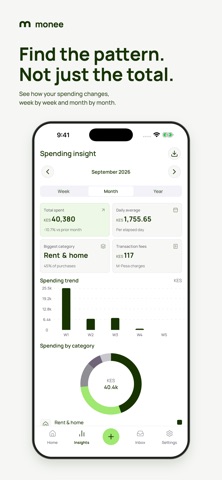
See the picture behind your payments Review spending by week, month or year. See category totals, daily averages and transaction fees without digging through messages.
Give each category a limit Set monthly budgets for groceries, food, transport, rent and more. See what is left at a glance.
Make it yours Choose Default or M3 Expressive, with six colour themes. Check spending and budgets from Material 3 Home Screen widgets, or jump into everyday tasks with quick actions and Siri Shortcuts.
Keep useful records Search past transactions and export an Excel workbook with your records, summaries and budgets. Manual tracking and saved records work offline. Excel exports are readable reports, not in-app restore files.
Your records, across your Apple devices Private iCloud sync is on by default when iCloud is available. Opening Monee restores and merges saved records on devices using the same iCloud account, including after reinstall. Turn sync off in Settings; existing off choices stay off. Signing in to Monee later keeps your records. Internet access and available iCloud storage are required, and iOS controls background timing.
Your choice Combined usage reporting is on by default when no choice has been saved. It shares daily payment counts and combined KES totals, not raw messages or merchants. Turn it off in Account & privacy. Core tracking works without reporting or a Monee account.
Monee is an independent expense tracker, not a bank, payment service or loan app. It does not move money or ask for your M-Pesa PIN, and is not affiliated with Safaricom or M-Pesa. Insights are informational, not personalised financial advice.
Need help? hello@pesastack.co
People rate it
Sign in to rate this app. Honest is what counts.
No ratings yet. Tried it? Be the first to rate it.
More Finance apps
Best new Finance apps this week NjukiYour rent should do more than pay for where you live
 Qwiky AIQuiky AI helps you understand and organise your everyday finances in one clear place
 Set Aside for TaxFreelance money arrives without anything taken out of it
 MidRate: Currency ConverterMidRate converts at the mid-market rate, the midpoint between what banks buy and sell a…
 MesuraMesura answers one question: how much can I safely spend before my next pay?
 Inflation WatchInflation Watch turns official price data into plain English