
Mulan: Dark Mode for Safari
Not claimedGive Safari a calmer look
By 亮 吴 · Utilities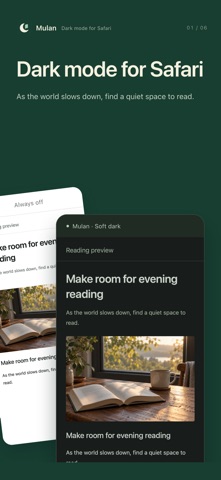



About
Give Safari a calmer look. Choose a reading theme, soften bright images and set a different appearance for each website.
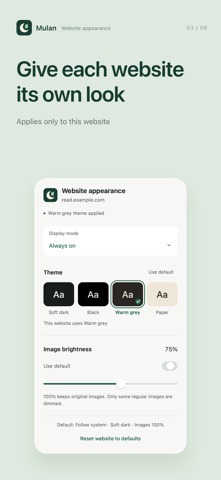
Theme Soft dark · Black · Warm grey · Paper
Display mode Follow system · Always on · Always off
Give each website its own look Adjust a website in the Mulan menu in Safari. Its settings will appear here. Only websites with custom settings are listed. Browsing history is not recorded. Subdomains have separate settings, for example www.example.com and news.example.com.
Image brightness 40–100%. 100% keeps original images. Only some regular images are dimmed.
On-device processing Website colours are processed on your device. Appearance and website settings are stored locally and shared by the app and Safari extension. Mulan does not collect or upload browsing history.
Setup guide 1. Go to Settings → Apps → Safari → Extensions. On earlier versions, start at Settings → Safari. 2. Enable Mulan, allow website access, then return to Safari and reload the page. 3. Use the Mulan menu in Safari to turn it on or off for the current website.
If images, charts, or colours look wrong, turn Mulan off for that website in Safari. This restores the original website; it does not force light mode.
Mulan needs to read and change website styles. It may also request external styles and images used by a page. These additional requests do not explicitly include login credentials.
People rate it
Sign in to rate this app. Honest is what counts.
No ratings yet. Tried it? Be the first to rate it.
More Utilities apps
Best new Utilities apps this week Drainly: Speaker CleanerMuffled speaker after a splash, rain, or a sweaty workout?
 Photo & PDF Resize: KBFile too large to upload?
 Arvectum Proxy LauncherArvectum Proxy Launcher is a network utility that routes your iPhone through a proxy you…
 Look Twice: Scam & AI CheckLook twice before you click
 Vodoalarm: vodostaji BiHVodoalarm javlja kad tvoja rijeka naglo raste, pa ne moraš stalno gledati vodostaje
 Ham Radio IQHam Radio IQ answers one question: which band is open right now, from where you are, and…