
Muslim Widget: Prayer & Qibla
Not claimedMuslim Widget is a prayer times and adhan app for salah and the Qibla
By K-UBE LLC · Education


About
Muslim Widget is a prayer times and adhan app for salah and the Qibla. Times for your city are calculated on your phone, using the method the mosques around you use, and the next prayer stays in sight in the app, on the Lock Screen and on Apple Watch.
Use it for the adhan, a compass toward Makkah, morning and evening azkar, a tasbih, dhikr and dua, and the Hijri calendar through Ramadan, iftar and sunnah days.
Main Features
Prayer times and the adhan Fajr in twenty minutes and you are still asleep? Salah for your location, a countdown, and an alert at the adhan: - Fajr, sunrise, Dhuhr, Asr, Maghrib and Isha, with iqamah after the adhan - Calculated on your phone, including when you are offline - ISNA, the Moonsighting Committee or the Muslim World League, with standard or Hanafi Asr - An adhan you can preview, a few minutes' warning, and a Friday reminder Mark the prayers you have prayed. In Ramadan, switch on suhoor and iftar.
Find the Qibla Which way is Makkah from this hotel room? - A live needle on true north - Bearing and distance to Makkah - The same direction on Apple Watch See the Qibla through the camera (Premium feature — Free trial available). The compass does not need Premium.
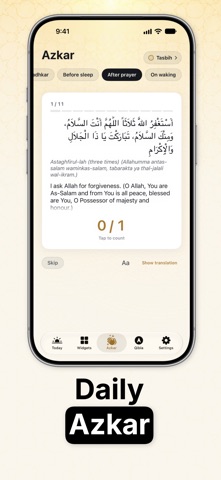
Azkar for the hour Asr has passed and the evening adhkar are still waiting? Count the routine this part of the day calls for: - Morning, evening, before sleep, after the prayer, and on waking - It follows your prayer times - From Hisn al-Muslim, with the repeat count on each line - The same progress on the Lock Screen and your watch You count it in the app.
Tasbih A quiet minute after salah? Drag the sebha: - Wood, today's count and the running total - A preset phrase or your own line, and a target for the round - Amber, onyx and pearl (Premium feature — Free trial available) The wooden sebha stays with the app.
Today and the Hijri date The Islamic date, a verse and a dua before you leave the house? Today opens on the next prayer and the Hijri date: - Hijri beside Gregorian, adjustable when the local sighting differs - A verse and a dua for the day, each with its source - A home mosque for your country, or one you choose The Hijri day turns at Maghrib.
Widgets on the Home Screen, Lock Screen and StandBy The next prayer, without unlocking the phone? - Prayer times, Hijri date, the day, azkar, a tracker, suhoor and iftar, days until Ramadan or Eid - A verse beside the next prayer, and a line under the clock from a verse, dua, hadith or name - Parchment, emerald, and Glass on prayer times, the Hijri date and the day - Glass on the other widgets; Hijri month and year, verse, dua, hadith, 99 Names, tasbih, a night reading, the moon, Jumuah and sunnah fasting (Premium feature — Free trial available) - Hourly or twice a day, and looks past parchment and emerald (Premium feature — Free trial available) Once a day or every three hours does not need Premium.
Apple Watch Maghrib is close and the phone is in the other room? The watch app and its complications carry the same day: - Next prayer, today's times, Hijri date and Qibla - Azkar, tasbih, and the prayers you have marked - Verse, dua, hadith, a name, the moon and fasting It keeps going for days without the phone beside you.
Your own look The gold arch icon and Paper, light or dark, come with the app. - The Glass theme, wallpaper behind the app (Premium feature — Free trial available) - Wallpaper scenes for Lock Screen and Glass widgets (Premium feature — Free trial available) - Night and gold icons (Premium feature — Free trial available) Premium is available with a free trial. The app has no ads.
Pray on time. Face Makkah. Keep the adhkar close.
People rate it
Sign in to rate this app. Honest is what counts.
No ratings yet. Tried it? Be the first to rate it.