
mvwizFTP
Not claimedmvwizFTP is a Mac file manager for FTP, SFTP and explicit FTPS servers
By changhwa lee · Utilities

About
mvwizFTP is a Mac file manager for FTP, SFTP and explicit FTPS servers. Browse folders, transfer files and edit remote source files in separate windows.
SAVED SERVERS Save connection profiles and select a server from the sidebar. Leave the starting path empty to open the account's login directory. Connections are reused across consecutive operations.
FILE MANAGEMENT Upload and download files and folders, drag files from Finder to upload, create folders, rename, delete and copy remote paths.
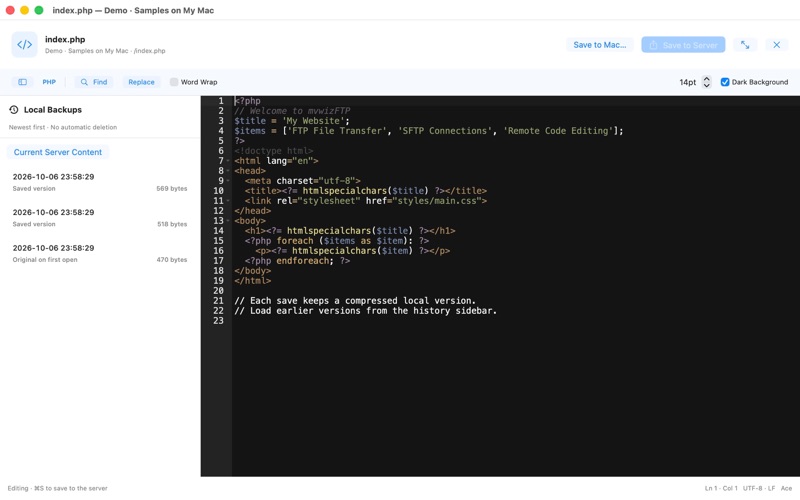
REMOTE CODE EDITOR Double-click PHP, JavaScript, HTML, CSS and other supported text files to edit immediately. The bundled Ace editor provides syntax highlighting, folding, search/replace and the Twilight theme. Resize the independent editor window and press Command-S to save to the server. The app checks for remote file changes before saving.
COMPRESSED LOCAL VERSION HISTORY When you first open a text file, its original contents are backed up once if no history exists. Each successful save then adds the saved version to a compressed SQLite database on your Mac. Browse dated versions in the editor sidebar and load one for editing or restoration. The Local Backups button above the server file list lets you search full paths, see backup counts and preview the latest version offline. There is no automatic expiry or version-count limit; storage depends on available disk space.
KOREAN FILENAMES AND CLEAR DELETION Automatically handles UTF-8 and CP949/EUC-KR filenames. Removing a saved server requires confirmation and also removes all of that server's local version backups. Remote files and folders remain unchanged.
IMAGE PREVIEW Preview and zoom PNG, JPEG, GIF, WebP, HEIC and other images supported by macOS. Animated or multi-frame images display their first frame.
LOCAL DEMO Try the app without a server account using the demo button on the welcome screen. The demo uses local sample files in the app's storage and does not connect to an external server.
REQUIREMENTS AND LIMITS • Apple Silicon Mac, macOS 26 or later • English and Korean interfaces, selected from your Mac’s preferred languages. English is the fallback for unsupported languages. • FTP, password-authenticated SFTP and explicit FTPS • Text editing: UTF-8 or UTF-16 with BOM, up to 5 MiB • Image preview: up to 25 MiB • SSH private key authentication and transfer resume are not supported.
No advertising or analytics SDKs. Files transfer directly between your Mac and the server you specify. Plain FTP is unencrypted; use SFTP or FTPS for protected connections.
People rate it
Sign in to rate this app. Honest is what counts.
No ratings yet. Tried it? Be the first to rate it.