
Network Toolkit: Reimagined
Not claimedNetwork tools, reimagined for modern iOS
By Yuxuan Hu · Utilities


About
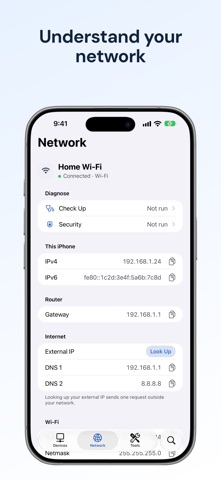
Network tools, reimagined for modern iOS. Discover devices, understand your connection, diagnose problems, and connect to your servers in one beautifully designed app.
20+ tools and features. One purchase. No subscriptions or in-app purchases.
DISCOVER YOUR NETWORK • Scan your LAN for connected devices. • View device details, rename devices, and keep your network organized. • Search devices and tools. • Inspect your current network connection. • Browse Bonjour and UPnP services. • Identify hardware vendors with MAC Lookup.
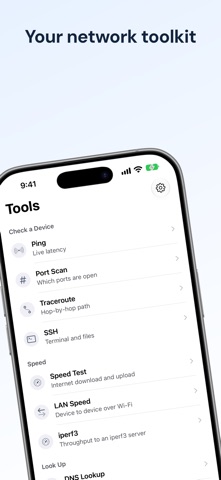
DIAGNOSE CONNECTIONS • Ping with live latency charts. • Scan ports and trace network routes. • Look up DNS records and Whois information. • Inspect HTTP responses and TLS certificates. • Run a connection checkup and review potential network security issues.
MEASURE PERFORMANCE • Test internet download speed, upload speed, and latency. • Measure local network speed. • Run iperf3 tests against a compatible server. • Review Wi-Fi roaming events.
CONNECT AND MANAGE • Connect with an SSH terminal and access remote files. • Send Wake-on-LAN packets. • Calculate subnets. • Review network change history and export device data.
BUILT FOR iOS • Widgets, Live Activities, and Control Center integration. • Siri and Shortcuts actions. • Native layouts with light and dark appearances.
STRAIGHTFORWARD PRICING Buy once and get all included tools. No recurring subscription and no feature-unlock purchases.
Local device discovery and saved network information are processed on your device. Internet diagnostics contact the services or hosts needed to perform the requested test. Internet speed tests use Measurement Lab (M-Lab), which publishes test results, including your public IP address; the app asks for agreement before the first test.
Local network discovery requires local network permission. Revealing your Wi-Fi network name may require location permission. SSH, LAN speed tests, iperf3, and Wake-on-LAN require compatible devices or servers. Use diagnostic tools only on networks and systems you own or are authorized to test.
Terms of Use (EULA): https://www.apple.com/legal/internet-services/itunes/dev/stdeula/ Privacy Policy: https://carmelappstudio.com/openrouter-usage/privacy
People rate it
Sign in to rate this app. Honest is what counts.
No ratings yet. Tried it? Be the first to rate it.