
Nevertold
Not claimedAn encrypted vault for your photos, passwords and LINE chats, locked with a key separate…
By Kazutaka Yamamoto · ProductivityWhy we expect it: Its clear privacy promise, specific use cases and careful explanation of encryption make it a promising vault for privacy-minded iPhone users.


About
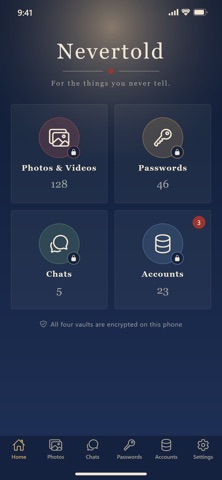
An encrypted vault for your photos, passwords and LINE chats, locked with a key separate from your phone. Even if family know your phone passcode, they can't open it. Your data never leaves your phone, and not even we can read it.
Nevertold is an iPhone app that gathers the important things scattered across your phone into an encrypted vault. No account is needed.
■ Made for moments like these - Family or a partner knows your phone passcode - You worry a private photo will pop up while you show someone your pictures - Your passwords are scattered across notes, screenshots and paper - You want to keep your own copy of your LINE chats - You're concerned about data stored in the cloud leaking
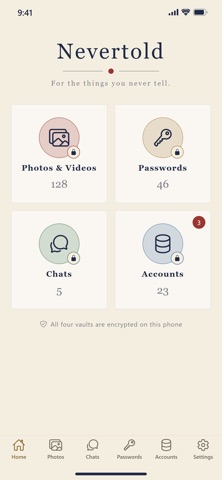
■ Four vaults - Photos & Videos: Import from the Photos app and keep them only in the vault. You can then delete the originals from the Photos app. - Passwords: Logins, cards and important notes. Import them by CSV from the iPhone Passwords app, Google Password Manager and more. Copied passwords are cleared after 60 seconds. - Chats: Keep LINE chats exported with "Export chat history," shown as conversations. - Accounts: See which services you have accounts with, and check for reused, weak or breached passwords.
■ Not a folder. An encrypted vault. - Everything you put in the vault is encrypted on your phone with AES-256-GCM. There are about 10^77 possible keys, so no computer today could find the key by trying them all. - That key can only be made from your password (or your recovery key). We don't have it either. - Turning your password into the key (scrypt) is deliberately slow, which also makes guessing your password hard. The longer and less guessable your password, the safer your vault (the app shows its strength). - Even if the files are copied out, or you lose your phone or send it for repair, the contents remain meaningless characters.
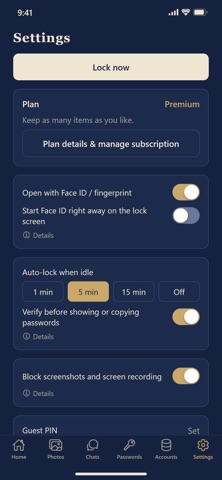
■ Opened with a key separate from your phone - The vault opens only with a password separate from your phone passcode (you can also choose to use Face ID; your phone passcode can't be used in place of Face ID). - Guest PIN: If someone asks you to show them, enter a different PIN to open a "guest vault" with only what you're happy to show. - Auto-lock when idle, a check before showing or copying passwords, and a wait after repeated wrong attempts. - While the vault is open, screenshots and screen recordings don't capture its contents.
■ Your data stays with you - Nothing is sent to our servers. A server breach can't leak your data. - We don't collect your information. No ads, no tracking.
■ FAQ Q. Can the developer see my data? A. No. Your data is encrypted only on your phone and never reaches us. We don't have the key either.
Q. If my vault files leak, can someone read them? A. No. The contents stay encrypted, and reading them requires your password or recovery key. Use a password that's hard to guess.
Q. What if I forget my password? A. You can open the vault with the recovery key you write down at setup. If you lose both your password and your recovery key, not even we can open it.
Q. Can I move to a new phone? A. Yes. Create a backup that stays encrypted, and restore it on your new phone.
Q. Does the breach check send my passwords? A. No. It sends only the first 5 characters of a value calculated from your password (SHA-1).
People rate it
Sign in to rate this app. Honest is what counts.
No ratings yet. Tried it? Be the first to rate it.