
NextSet - Simple Rest Timer
Not claimedNextSet is a simple rest timer for your sets
By Mario Kernich · Health and fitness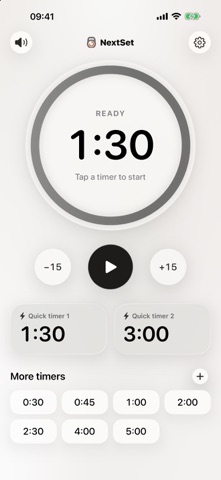



About
NextSet is a simple rest timer for your sets. Tap one of your quick timers and your rest starts. You feel and hear the last seconds on your wrist or iPhone – then it’s time for your next set.
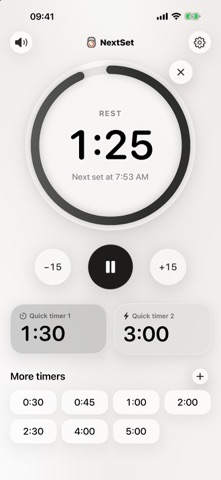
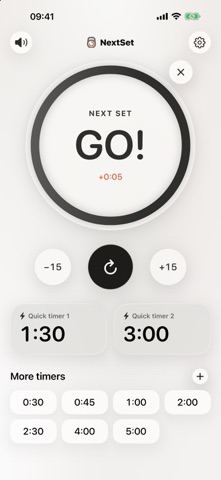
ONE TAP TO REST • One or two big quick timers on the start screen (1:30 and 3:00 to begin with) • Up to 12 more timers below, each started with a single tap • Tap another timer during a rest to switch straight to it • ±15 seconds, pause and resume, or end your rest early • When the rest is over, “GO!” counts the time you’ve gone over, and “Repeat rest” starts the same rest again
A COUNTDOWN YOU CAN FEEL • Signal in the last 3, 5 or 10 seconds – or turn it off • Strong haptics on iPhone, the Taptic Engine on Apple Watch • Three sounds: Beep, Chime and Digital. On iPhone they play over your music, which is briefly lowered, and even in silent mode • Mute the sounds right from the start screen
MADE FOR APPLE WATCH • Big quick timers right on the start screen, more timers below • Full-screen ring with countdown, ±15 s, pause and “Repeat rest”, also on the Always On display • Keeps running with your arm down, so the countdown taps and the end signal reliably reach your wrist • Timers sync with your iPhone and can be edited on both devices
ALWAYS IN VIEW • Live Activity on the Lock Screen, in the Dynamic Island and in the Smart Stack on Apple Watch • A notification when your rest is over while the app is in the background • The display stays on during a rest (optional)
SIRI, SHORTCUTS & ACTION BUTTON • “Start Quick Timer”, “Start Rest Timer” with any number of seconds, and “End Rest” • Start a rest hands-free with Siri or the Action button
YOUR TIMERS, YOUR WAY • Rename timers, for example “Squats” • Reorder or delete them – long-press a timer for more options • Light and dark mode, large rounded digits, Liquid Glass design
PRIVATE BY DESIGN No account, no ads, no tracking. Your timers and settings stay on your devices.
People rate it
Sign in to rate this app. Honest is what counts.
No ratings yet. Tried it? Be the first to rate it.