
Ninety - Level, Angle, Measure
Not claimedNinety turns your iPhone into a measuring tool for construction, DIY and everyday…
By PIERRE JORG STRUBELT · Productivity



About
Ninety turns your iPhone into a measuring tool for construction, DIY and everyday projects.
Level surfaces, measure angles and slopes, check right angles, measure distances and compare heights – all in one app. Traditional measurements use the iPhone's built-in sensors, while AR lets you measure directly in the camera view.
LEVEL & SLOPE
• Level surfaces • Check boards, battens and edges • Set target slopes in %, degrees or mm/m • Use audio and haptic feedback • Calibrate the sensors for precise tilt measurements
ANGLE & PLAN
• Measure angles and inclines • Set targets such as 90°, 45° or any custom angle • Set out a right angle from an existing wall • Set and transfer reference angles • Use the gyroscope for plan-view measurements
AR MEASUREMENT
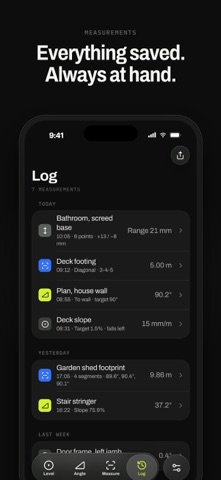
• Measure distances directly in the camera view • Add multiple measurement points • Display corner angles automatically • Measure individual segments and total distance • Save measurements for later
HEIGHT & REFERENCE MARK
• Set a reference mark for height measurements • Compare heights at different points • Check excavation, paving and screed against a target level • Scan floor areas to visualise height differences • Record measurement points in a height log
3-4-5 CHECK
Verify right angles with a tape measure. Enter two sides and 90° calculates the required diagonal. You can also check rectangles by comparing their diagonals.
People rate it
Sign in to rate this app. Honest is what counts.
No ratings yet. Tried it? Be the first to rate it.