
Nudge the Smart Alarm
Not claimedMost alarms go off at an arbitrary minute, often right in the middle of deep sleep
By Kellis LE LOUER · Health and fitness



About
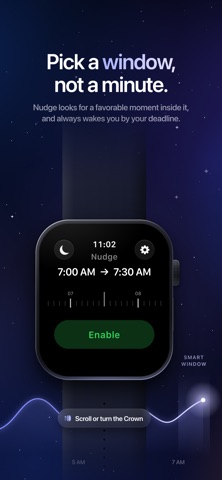
Most alarms go off at an arbitrary minute, often right in the middle of deep sleep. Nudge works differently: you choose a wake-up window, and Nudge looks for a favorable moment inside it to wake you, gently, right on your wrist.
PICK A WINDOW, NOT A MINUTE Set the time you need to be up and a smart window of up to 30 minutes before it. Scroll the timeline or turn the Digital Crown, tap Enable, and you're set. Nudge always wakes you by your deadline.
IT READS YOUR SIGNALS During the window, Nudge looks at your wrist movement and recent heart rate on Apple Watch and waits for a favorable moment to wake you. The closer you get to your deadline, the more readily it lets you wake.
A GENTLE WAKE-UP Nudge wakes you with haptics on your wrist that start softly and build up progressively, until you tap "I'm Awake".
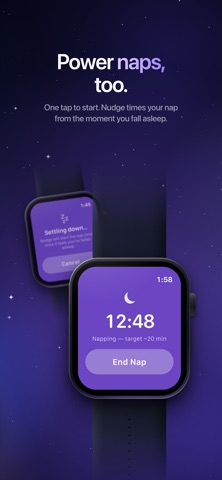
POWER NAPS Tap the moon to start a nap. Nudge starts the timer once it senses you've fallen asleep, then wakes you at a favorable moment around your target of about 20 minutes.
PLAN IT ON IPHONE Use the iPhone app to create repeating alarms (weekdays, weekends or specific days), each with its own smart window and label. Alarms sync to your Apple Watch automatically.
PRIVATE BY DESIGN • Your health data is processed on your Apple Watch and never leaves it • No account, no sign-up • No tracking, no ads • Works without Health access, in a simpler mode
REQUIREMENTS Nudge runs on Apple Watch. The iPhone app is a companion for planning your alarms.
Nudge is not a medical device. It does not diagnose sleep disorders or detect sleep stages with certainty; it estimates a favorable moment to wake you from the signals your Apple Watch makes available.
People rate it
Sign in to rate this app. Honest is what counts.
No ratings yet. Tried it? Be the first to rate it.