
Oath: 2FA Authenticator
Not claimedTwo-factor codes that fill themselves
By LITE AI TECHNOLOGY PTE LTD · Utilities





In short
Oath is an authenticator for 2FA codes, passwords and passkeys that suggests one-time codes above the iOS keyboard when a site asks for them. It suggests codes, passwords and passkeys in Safari and supported apps, and each suggestion is tied to a space such as personal or work, so accounts on the same site stay separate.
Summary by Debuts, based on the App Store listing.About
Two-factor codes that fill themselves.
Oath is an authenticator for your 2FA codes, passwords and passkeys. When a site asks for a verification code, Oath suggests it right above the keyboard. No switching apps, no copying six digits against a countdown.
AUTOFILL THAT KNOWS WHICH ACCOUNT • One-time codes appear above the keyboard in Safari and supported apps • Passwords and passkeys fill from the same place • Every suggestion shows its space, so your work login never gets your personal code
A 2FA AUTHENTICATOR DONE PROPERLY • Add accounts by scanning a QR code, choosing a screenshot, or pasting an otpauth:// link • TOTP with SHA-1, SHA-256 and SHA-512, 6 or 8 digits, custom periods • Live countdown ring; tap any code to copy it • Optional preview of the next code
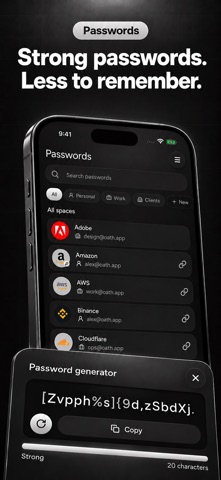
PASSWORDS AND PASSKEYS • Built-in generator for strong passwords • Password Health finds weak and reused passwords, and logins that support two-factor authentication but don't have a code yet • Save passkeys and sign in with them. Signing in with a saved passkey is always free
SPACES FOR EVERY IDENTITY Keep personal, work and client accounts apart. Each code, password and passkey belongs to one space, and AutoFill shows it, so two accounts on the same site never get mixed up.
PRIVATE BY DESIGN • No account, no sign-up, no ads, no tracking • Your vault is encrypted on this device; the key stays in the iOS Keychain • Optional iCloud sync keeps your vault in your private iCloud database, in encrypted fields • Face ID lock, auto-lock and a privacy cover in the app switcher • Copied codes and passwords clear from the clipboard after 60 seconds • Deleted items stay in Trash for 30 days
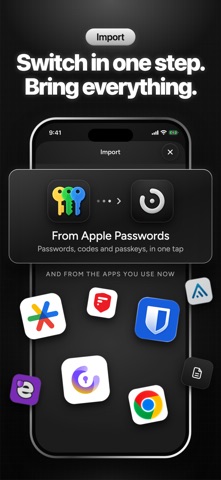
EASY TO MOVE IN, EASY TO LEAVE • Import from Google Authenticator (export QR codes), 2FAS, Aegis, Ente Auth, Proton Authenticator, Bitwarden, and Apple Passwords or Chrome (CSV) • Export an encrypted backup at any time, free
FREE AND PRO Free: up to 10 codes, 25 passwords and 10 passkeys, with Face ID lock, import, backup and export included. Oath Pro removes all three limits and adds AutoFill for codes and passwords, multiple spaces, and encrypted iCloud sync between your iPhones.
SUBSCRIPTION INFORMATION Oath Pro is available as a weekly or yearly auto-renewing subscription, or as a one-time Lifetime purchase. Eligible new subscribers get a 3-day free trial on weekly and yearly plans. Payment is charged to your Apple Account when you confirm the purchase, or when the free trial ends. Subscriptions renew automatically unless cancelled at least 24 hours before the end of the current period. You can manage or cancel your subscription in your Apple Account settings.
Terms of Use: https://www.apple.com/legal/internet-services/itunes/dev/stdeula/ Privacy Policy: https://oath.thematrixapp.com/privacy/
People rate it
Sign in to rate this app. Honest is what counts.
No ratings yet. Tried it? Be the first to rate it.
More Utilities apps
Best new Utilities apps this week Drainly: Speaker CleanerMuffled speaker after a splash, rain, or a sweaty workout?
 Photo & PDF Resize: KBFile too large to upload?
 Arvectum Proxy LauncherArvectum Proxy Launcher is a network utility that routes your iPhone through a proxy you…
 Look Twice: Scam & AI CheckLook twice before you click
 Vodoalarm: vodostaji BiHVodoalarm javlja kad tvoja rijeka naglo raste, pa ne moraš stalno gledati vodostaje
 Sift: Photo CleanupYour camera roll is full of blurry shots, old screenshots and videos you'll never watch…