
One Take Studio
Not claimedTurn a vocal idea into a demo on your iPhone
By Ivan Shuvalov · Music and audioWhy we expect it: Clear value and a thorough description make this a promising pick for iPhone songwriters sketching demos.



In short
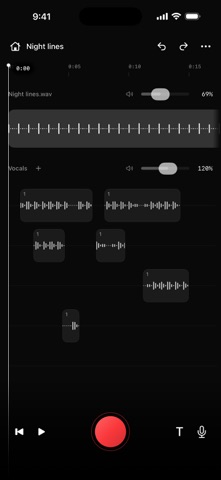
One Take Studio is an iPhone app for turning a vocal idea into a demo by importing a beat, recording vocals and arranging multiple audio tracks. It suits people sketching songs who want to edit clips, apply vocal presets and export a mixed MP3 or a ZIP of WAV stems. One notable detail is that projects stay on the device and are excluded from iOS backups, so exporting recordings is the only way to keep them safe.
Summary by Debuts, based on the App Store listing.About
Turn a vocal idea into a demo on your iPhone. Import a beat, record your voice and build an arrangement with multiple audio tracks.
Record and edit • Import common MP3, WAV and M4A audio files. • Record vocals over your beat. • Move, trim, split and duplicate clips. • Adjust levels and undo edits. • Keep lyrics over the timeline while recording. Scroll from the left edge and keep the canvas accessible.
Shape your sound • Choose vocal presets with pitch correction, EQ and compression. • Combine sample effects and adjust their wet/dry amounts. • Apply local noise cleanup while retaining original recordings. • Detect a beat's key on-device or choose it manually, with detuning from −100 to +100 cents in steps of 10. • Monitor through connected headphones. Wired headphones are recommended for timing.
Export your idea • Share a mixed MP3 demo. • Export a ZIP with processed and dry WAV files for each occupied audio track, plus a separate beat. • Import all WAV tracks at 00:00 to keep the arrangement aligned in another audio editor.
No account is required. Recording, editing and audio processing run locally. You choose when to save or share an export. Projects are stored only on this device and are excluded from automatic iOS backups, so export important recordings before deleting the app or changing devices.
People rate it
Sign in to rate this app. Honest is what counts.
No ratings yet. Tried it? Be the first to rate it.
More Music and audio apps
Best new Music and audio apps this week KlingKlang – Control de AudioKlingKlang reúne todas las salas de tu sistema Sonos en una sola pantalla
 BANANA-1One banana
 Acord: Guitar Tuner, MetronomeAcord is a precise tuner and metronome for every musician
 MonandaegMōnandæg is two field recorders that cannot leave anything alone
 Yul — Gugak Tuner & JangdanA tuner and rhythm trainer built for Korean traditional instruments
 MusiquitosMusiquitos es una app de música para niños con treinta canciones para cantar, bailar y…