
Oni Swipe
Not claimedYou took a few extra shots to get the right one
By YOSHIHIRO FUJITA · Photo and videoWhy we expect it: The swipe-based cleanup, keep-if-unsure rule, and review-before-delete safety make the value easy to grasp.




About
You took a few extra shots to get the right one. You saved a screenshot for later. Now it’s time to choose what to keep.
Oni Swipe helps you organize photos by swiping left or right.
KEEP THE MAYBES. TAKE ANOTHER ROUND. Swipe right to keep a photo and left to mark it for deletion. If you’re not sure, keep it. Review only the photos you kept on another round, as many times as you like. Stop when you’re ready.
REVISIT YOUR MEMORIES FIRST Browse photos grouped by capture time before you start swiping. Open individual photos for a closer look as you decide what to keep.
SORT SCREENSHOTS IN GROUPS Review screenshots grouped by when they were taken. Keep what you need and clear out what you no longer want.
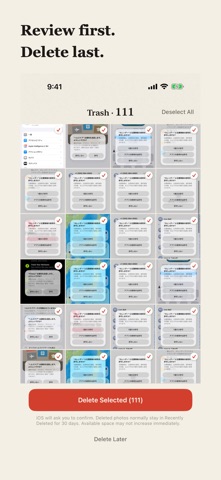
REVIEW BEFORE DELETING Swiping alone never deletes photos. Review the Trash and return anything you want to keep before confirming deletion with iOS.
One-time purchase. No ads or subscriptions. No AI decides which photos to keep. You do.
Choose a start and end date to focus your cleanup. Review photos by scene, or swipe through all photos in the selected period as one group. All Photos includes screenshots and excludes videos. When you return after an interruption, choose to resume or start over. After deletion, review the next group before starting to swipe. The completion screen shows how many photos were deleted.
People rate it
Sign in to rate this app. Honest is what counts.
No ratings yet. Tried it? Be the first to rate it.