
OpenKitchen3D - Cabinet Design
Not claimedDesign on the big screen: open a kitchen scanned on your iPhone or iPad, start from the…
By Laan Consulting Corp · Productivity



About
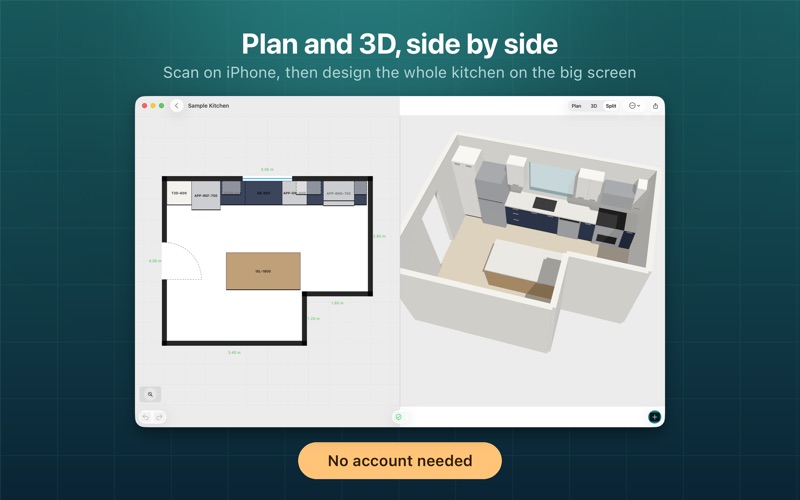
Design on the big screen: open a kitchen scanned on your iPhone or iPad, start from the sample kitchen or draw a room, then edit and export. Room scanning needs an iPhone or iPad.
PRIVATE BY DESIGN No account. Your kitchens are stored on your device. Nothing leaves it unless you choose to share a link or export a file.
OpenKitchen3D is open source (MIT) and powered by the OpenPlan3D engine. Scans and AR measurements are a starting point: always confirm dimensions on site before ordering cabinets.
DESIGN THE KITCHEN • Base, wall and tall cabinets, sinks, ranges, dishwashers, refrigerators, range hoods and islands • Cabinets snap to the nearest wall, face into the room and line up with their neighbours • Choose standard widths, adjust depth, height and mounting height, and pick a finish for every unit • Plan view, 3D view, and plan and 3D side by side on iPad and Mac • Undo and redo, duplicate, rotate and delete; keyboard shortcuts on iPad and Mac • Design checks flag overlapping cabinets, blocked doorways, cabinets over windows, narrow aisles around islands and dimensions you have not confirmed
SHARE AND EXPORT • Cabinet schedule with SKU, finish and size for every unit, exported as CSV • Open the kitchen in OpenPlan3D or OpenKitchen3D on the web with a link • Export an OpenPlan3D-compatible JSON file, or a 3D model (USDZ) • Preview the design at true scale in AR on iPhone and iPad • Import kitchens from the web planner or a JSON file with AirDrop, Files or a link
People rate it
Sign in to rate this app. Honest is what counts.
No ratings yet. Tried it? Be the first to rate it.