
Paperwell: PDF Editor & Sign
Not claimedPaperwell is the PDF editor that respects your files
By Sean Kinsman · Productivity


In short
Paperwell: PDF Editor & Sign is a productivity app for editing, filling, signing, and organizing PDFs, with processing done entirely on the device and no uploads, accounts, or ads. It suits people who handle documents and want to keep their files local. Standout: it can redact sensitive details such as SSNs and emails, and a Pro tier adds OCR, Word conversion, and AES password protection.
Summary by Debuts, based on the App Store listing.About
Paperwell is the PDF editor that respects your files. Everything happens on your device: no uploads, no accounts, no ads.
EDIT LIKE A PRO • Click any line of text and rewrite it • Add text, images, shapes, arrows, and freehand drawing • Highlight, underline, strike through, and leave comments • Whiteout mistakes and crop pages
FILL & SIGN • Fill in any PDF form, even ones without fillable fields • Draw, type, or upload your signature and initials • Add dates, checkmarks, and stamps like APPROVED and CONFIDENTIAL • Turn any document into a fillable form
ORGANIZE • Drag to reorder pages, and rotate, delete, or duplicate them • Merge PDFs and images into one file • Split by page count or custom ranges • Extract just the pages you need
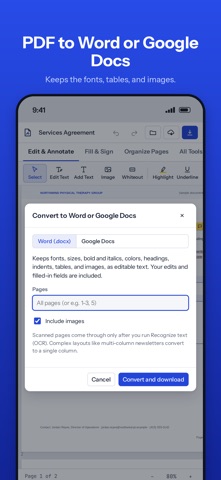
PAPERWELL PRO • Recognize text (OCR) so scans become searchable • Convert PDFs to Word or Google Docs while keeping fonts, tables, and images • Redact names, emails, SSNs, and more, for good • Password-protect PDFs with AES encryption, or unlock them • Compress files for email • Compare two versions and see every change • Add Bates numbering, headers, footers, and watermarks
PRIVATE BY DESIGN Your documents are processed on your device. Nothing is uploaded to our servers, because we don't have any.
Save to Files, share to Mail, AirDrop, Google Drive, and more, or print straight from the share sheet.
Pro is available as a monthly or yearly subscription with a free trial. Payment is charged to your Apple ID. Subscriptions renew automatically unless canceled at least 24 hours before the end of the period. Manage them in your App Store account settings.
Terms of Use: https://www.apple.com/legal/internet-services/itunes/dev/stdeula/ Privacy Policy: https://claude.ai/artifact/HTQAotHTwyUKEGiTXB7CRA#privacy
People rate it
Sign in to rate this app. Honest is what counts.
No ratings yet. Tried it? Be the first to rate it.
More Productivity apps
Best new Productivity apps this week ChickMark: Habit TrackerChickMark is a simple habit tracker for routines, goals, and reminders
 Dayflint: One Thing a DayToo many priorities?
 Snappy Do ItSix connected modes. One traceable journey.
 Fristo CAFMFristo is the app for Fristo CAFM, the facility management software
 UhWhat? Voice NotesCatch the thought before it disappears
- BeginAnywayMorning alarm for hard tasks: set one task, prove you started, build a streak